


A deep dive into Olivier Chafik & Anton Pidkuiko’s talk at MCP Dev Summit North America 2026
Anthropic engineers Olivier Chafik and Anton Pidkuiko teach us howMCP Apps work, where they break, and what patterns hold up in production.
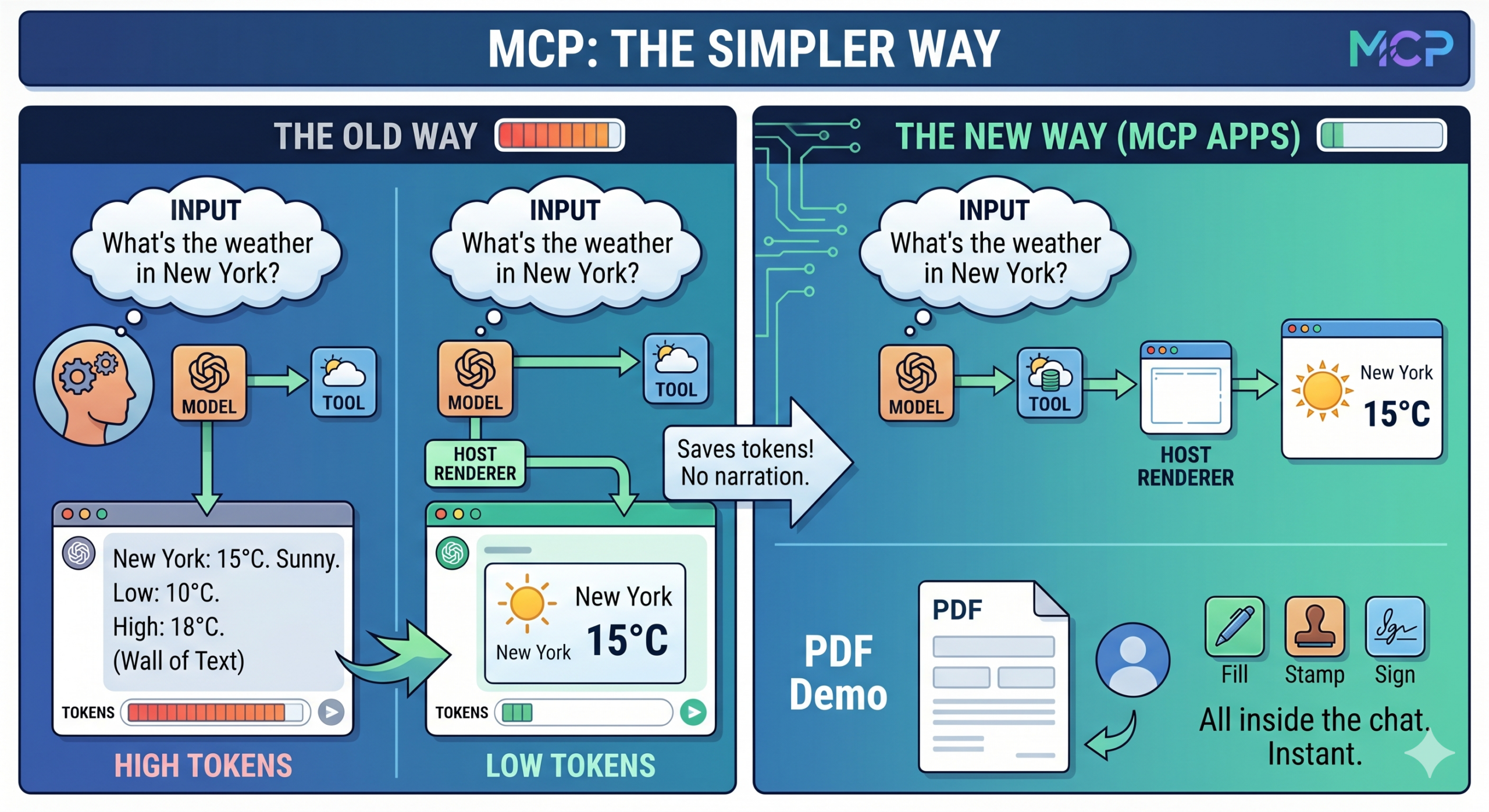
MCP Apps exist because displaying data in chat is wasteful. Take the case of a simple request like “What’s the weather today in New York?” When a user asks for it, the model gets JSON from the tool, converts it to text, and sends it back, token by token. The user reads a wall of formatted text.
With MCP Apps, the tool response includes a reference to an HTML resource. The host renders it directly. The user gets an interactive widget. The model never has to narrate the output.
That cuts tokens, reduces latency, and produces a better experience. Anton demoed this live with a PDF viewer that lets users fill in fields, stamp documents, and add signatures, all inside the same chat window, without reloading.
Data flows: Where data goes, and why it matters
Understanding the data flow between servers, apps, and models determines how well your MCP App behaves, and where it quietly breaks.
Tool results carry three distinct fields, each with a different destination:
- content goes to the model. Keep it short. When your app is rendering the output, the model doesn’t need a full narration — just enough to know what was displayed.
- structuredContent is typed data your app can read. The model may or may not see it. If content is also present, structuredContent is hidden from the model. Use this for data you want the app to consume in a structured way.
- _meta goes to the app only. The model never sees it. This is the right place for internal IDs, prefetched data, view UUIDs, or anything that’s purely operational.
Each field has one destination, and mixing them up produces bugs that are hard to spot.
Authentication and access: direct fetching versus tool calls
How your app gets data depends on whether it needs authentication. Without it, go direct. With it, use tool calls.
If your app doesn’t need auth, it behaves like a standard web app. You can fetch, use WebSockets, load external scripts. You do need to declare which domains you’ll connect to, and if your APIs have strict CORS rules, you’ll want your app served from a stable domain, the spec supports this.
If your app needs authentication, irs best to stay direct: don’t try to pass tokens through tool results. Tokens expire. A user loading a chat from three weeks ago will hit a broken state. Instead, use tool calls for anything that requires auth. That reuses the host’s existing auth infrastructure and avoids the token expiration problem.
The spec also supports app-visible-only tools, tools the model never sees. These are useful for internal operations you want the app to handle without exposing extra tools that could confuse the model.
Keeping the model informed
The app and the model need to stay in sync. MCP Apps have a primitive called updateModelContext that handles this. Your app can push text or images to the model (page screenshots, current state, selection context) and it won’t be sent until the next user turn. You can call it a thousand times during a session. Only the last version is picked up.
For example, this is how the PDF viewer works. Every time the user changes pages or updates a selection, it pushes a screenshot and the current page number to the model context. If the user flips through 100 pages without typing, no tokens are consumed. When they do type, the model has accurate context.
For cases where you want the model to know exactly what the user is looking at, this pattern is more reliable than trying to encode state in text.
Streaming for latency
Large tool call arguments (sometimes 10,000 tokens or more) can become a real latency bottleneck. The spec now supports partial input streaming, which lets the app start rendering before the full tool result is ready.
In practice, as soon as the host sees a tool name, it can fetch the resource and boot the app. The app gets partial inputs as they arrive and can show a progress indicator or start rendering incrementally. The full inputs and tool results arrive later. This is host-managed and optional, but for AI-heavy apps with large outputs, it’s a meaningful performance improvement.
Anton showed a streaming example where a time series chart renders progressively as data arrives, rather than the user waiting for a complete response before anything appears.
State persistence: Two patterns
State persistence isn’t in the core spec yet, but two patterns work today.
The first is server-side storage. You implement get and set tools on your server, keyed to the view’s unique ID. It’s more setup, but it’s guaranteed to work across machines and sessions.
The second is local storage. MCP Apps are web apps, and local storage is available. It’s easier to implement, but less reliable: clients may clear it, and it won’t work across devices. For non-critical state, it’s a reasonable option.
Building for multiple hosts: Handshakes do the work
Many teams already have MCP servers and want to add UI without breaking non-UI clients. The solution is capability detection at initialization. During the MCP handshake, you can check whether the client supports MCP Apps. If it doesn’t, you hide the app-specific tools. If it does, you expose them.
The same logic applies inside the app. There’s a second handshake between the app and the host, and every capability in the protocol is optional. The goal is graceful degradation, your app should work reasonably across hosts even when certain features aren’t available.
How to seamlessly blend MCP Apps into UX
MCP Apps should notlook out of place. The host passes context to the app at initialization, including whether the interface is in light or dark mode, CSS variables, and information about UI elements that might obscure parts of the screen.
A few practical notes from the talk:
- avoid vertical scrolling in inline mode
- use pinch gestures to transition to full screen on mobile,
- use debouncing if you’re taking screenshots to update the model context. The goal is an app that feels like part of the host, not something dropped in from another context.
How coming spec changes impact MCP Apps
Two upcoming spec changes are worth knowing about. View-local tools will let the app declare its own tools without routing through the server, cleaner architecture, less statefulness required. And the host will be able to push data directly to the view, eliminating the polling pattern that some apps currently use to receive model updates.
MCP Apps is gaining momentum and the community working around it is highly active. Join the conversation. File an issue. And learn to build interactive MCP user experiences because that’s what people are going to be expecting.
The full talk is worth watching if you’re building MCP Apps or planning to. The AAIF open source repo has working examples across multiple frameworks.
Join the conversation in the AAIF Discord and explore the MCP GitHub repository to start building.