


A hands-on look at running a local-first agent on the NVIDIA DGX Spark: zero cloud calls, on a 128 GB box that fits on a desk.
Almost every agent demo you see talks to a frontier model over a cloud API. It works, but it quietly assumes your code, your prompts, and your data are leaving the building. goose, the open-source agent framework built at Block and now hosted by the Agentic AI Foundation under the Linux Foundation, does not have to work that way. It is local-first: point it at a model running on your own hardware and the whole loop, reasoning, tool calls, file edits, shell commands, can run without a single packet leaving the machine.
I wanted to test the strongest version of that claim. Take a real agent, point it at a model running locally, give it actual work to do, and then prove that nothing went to the cloud. The machine for the job is the NVIDIA DGX Spark: a GB10 Grace Blackwell box with 128 GB of unified memory that sits on a desk and draws less power than a space heater.
Here is how it went.
The setup in one picture
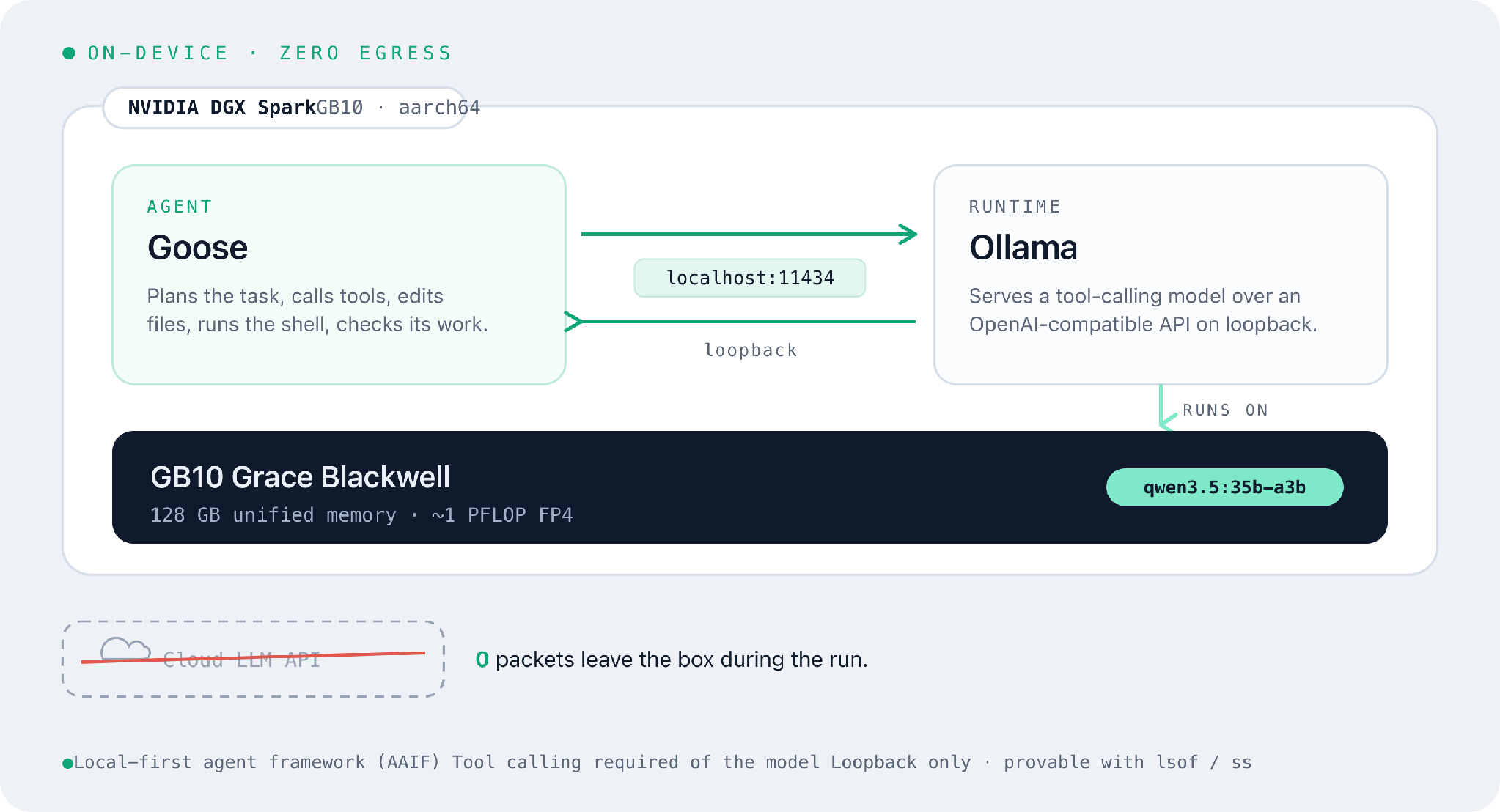 goose talks only to a local Ollama runtime over loopback on a DGX Spark; no cloud API is involved.
Three pieces, all on one box:
- Ollama is the model runtime. NVIDIA and Ollama partnered so it runs well on the Spark out of the box, and it exposes an OpenAI-compatible API on localhost:11434.
- goose is the agent. It plans, calls tools, edits files, and runs commands. Its Developer extension is what turns “chat” into “actually does things.”
- The model is whatever you load with Ollama, as long as it supports tool calling. That last requirement is not optional, and it is the thing people most often get wrong.
The only network hop in the entire loop is the loopback interface between Goose and Ollama. We prove that at the end.
First, meet the box
Before trusting any benchmark, it is worth confirming what we are actually running on. The Spark is an ARM machine, so uname reports aarch64, and nvidia-smi confirms the GPU: a single NVIDIA GB10 on driver 580, CUDA 13.
$ nvidia-smi
| GPU Index | Name | Persistence Mode | Bus ID | Display Active | Volatile Uncorr. ECC | Fan | Temp | Perf State | Power Usage / Cap | Memory Usage | GPU Util | Compute Mode |
| 0 | NVIDIA GB10 | On | 0000000F:01:00.0 |
Off | N/A | N/A | 45°C | P8 | 4W / N/A | Not Supported | 0% | Default |
One detail surprises people: the Memory-Usage column reads Not Supported. That is not a broken driver. The GB10 is a unified-memory design, so the GPU has no separate framebuffer to report. The CPU and GPU share one coherent pool of LPDDR5X, and you read it with an ordinary Linux tool:
free -h
The spec sheet says 128 GB; free reports what is left after firmware and OS overhead, as a single pool that both the CPU and the GB10 draw from:
$ free -h
total           used        free      shared  buff/cache   available
Mem:            121Gi       3.8Gi       116Gi       6.6Mi       2.8Gi       117Gi
Swap:           15Gi          0B        15Gi
That is 121 GB of usable unified memory. With nothing loaded it is almost entirely free, and loading qwen3.5:35b-a3b later takes only about 29 GB of it. This is the number that matters for “what model can I fit,” and it is why a desk-sized box can hold models that would never fit on a normal GPU.
A model that can actually use tools
Ollama is an easy docker-like way to run the open source models. A quick check of the version and the models already on disk:
$ ollama -v
ollama version is 0.30.10

$ ollama list
NAME                       ID              SIZE      MODIFIED
llama3.1:8b                46e0c10c039e    4.9 GB    5 weeks ago
qwen3.5:0.8b-bf16          81a0b6550a2d    1.8 GB    7 weeks ago
gemma4:26b                 5571076f3d70    17 GB     2 months ago
gemma4:latest              c6eb396dbd59    9.6 GB    2 months ago
qwen2.5vl:7b               5ced39dfa4ba    6.0 GB    3 months ago
nemotron-3-super:latest    95acc78b3ffd    86 GB     3 months ago
qwen3.5:35b-a3b            3460ffeede54    23 GB     3 months ago
Here is the catch that trips most people up: goose leans hard on tool calling, so the model must support it. A model without tool calling can only chat, which means disabling every extension and giving up the whole point of an agent.
That requirement narrows the field. From the list above:
qwen3.5:35b-a3bis the one I reached for. The Qwen3 lineage has excellent tool calling, and its mixture-of-experts design (the a3b means only about 3B parameters are active per token) keeps it fast despite being a 35B-class model. At 23 GB it leaves most of the Spark’s memory free.llama3.1:8bis a great lighter alternative. Llama 3.1 has native tool calling, and at under 5 GB the agent turns feel snappy.
Don’t trust the model card, test it
Model cards are optimistic. The honest check is to ask the model to call a tool through Ollama’s API and see whether it actually returns a tool_callsfield:
curl -s http://localhost:11434/api/chat -d '{
"model": "qwen3.5:35b-a3b",
"stream": false,
"messages": [{"role":"user","content":"What is the weather in Paris? Use the tool."}],
"tools": [{"type":"function","function":{
"name":"get_weather",
"description":"Get current weather for a city",
"parameters":{"type":"object","properties":{"city":{"type":"string"}},"required":["city"]}
}}]
}' | jq '.message'
The model came back with an empty content and a populated tool_calls. It chose to call the tool, with the right function and the right argument:
{
  "role": "assistant",
  "content": "",
  "thinking": "The user wants to know the weather in Paris and has specifically asked me to use a tool ... I should call the get_weather function with \"Paris\" as the city parameter.",
  "tool_calls": [
    {
      "id": "call_hsv7poun",
      "function": {
        "name": "get_weather",
        "arguments": { "city": "Paris" }
      }
    }
  ]
}
That is exactly what an agent-capable model should do. If instead you get only plain text in content and no tool_calls, that model cannot drive goose. Pick another and run the test again. While we are here, a quick look at raw decode speed. The –verbose flag makes Ollama print timing, including the eval rate in tokens per second:
$ ollama run qwen3.5:35b-a3b --verbose "What is an AI agent? Answer in one sentence."
An AI agent is an autonomous system powered by artificial intelligence that can
perceive its environment, make reasoned decisions, and take independent actions
to achieve specific goals without constant human intervention.

total duration:       25.884s
load duration:         8.914s
prompt eval count:        20 token(s)
prompt eval rate:     146.02 tokens/s
eval count:             1283 token(s)
eval duration:        16.830s
eval rate:             76.23 tokens/s
About 76 tokens per second of decode on a desk-sized box. ollama ps confirms where it ran and how much memory it took:
$ ollama ps
NAME              ID              SIZE     PROCESSOR    CONTEXT    UNTIL
qwen3.5:35b-a3b   3460ffeede54    29 GB    100% GPU     262144     4 minutes from now
</pre

The 100% GPU is the part that matters: none of the model spilled to the CPU. The 29 GB footprint (a little above the 23 GB on disk, once the context window is allocated) still leaves the large majority of the Spark’s 128 GB free.
Installing goose
goose installs with a single script. Note the source: it now lives under the aaif-goose GitHub organization, the project’s new home since it joined the Agentic AI Foundation. curl -fsSL https://github.com/aaif-goose/goose/releases/download/stable/download_cli.sh | bash The install script detects the architecture (the Spark is aarch64) and drops the binary in ~/.local/bin/. Add that to your PATH and check the version:
$ export PATH="$HOME/.local/bin:$PATH"
$ goose --version
1.39.0
Wiring goose to the local model
One interactive command points goose at a model:
goose configure
The first screen asks how you want to set up your provider, and it defaults to a cloud option:
How would you like to set up your provider?
> OpenRouter Login (Recommended)
Tetrate Agent Router Service Login
Manual Configuration
The first two are cloud routing services, the opposite of what we are after. For a fully local setup, arrow down to Manual Configuration and press Enter. From there, choose Ollama as the provider, point it at http://localhost:11434, and enter the model name qwen3.5:35b-a3b.
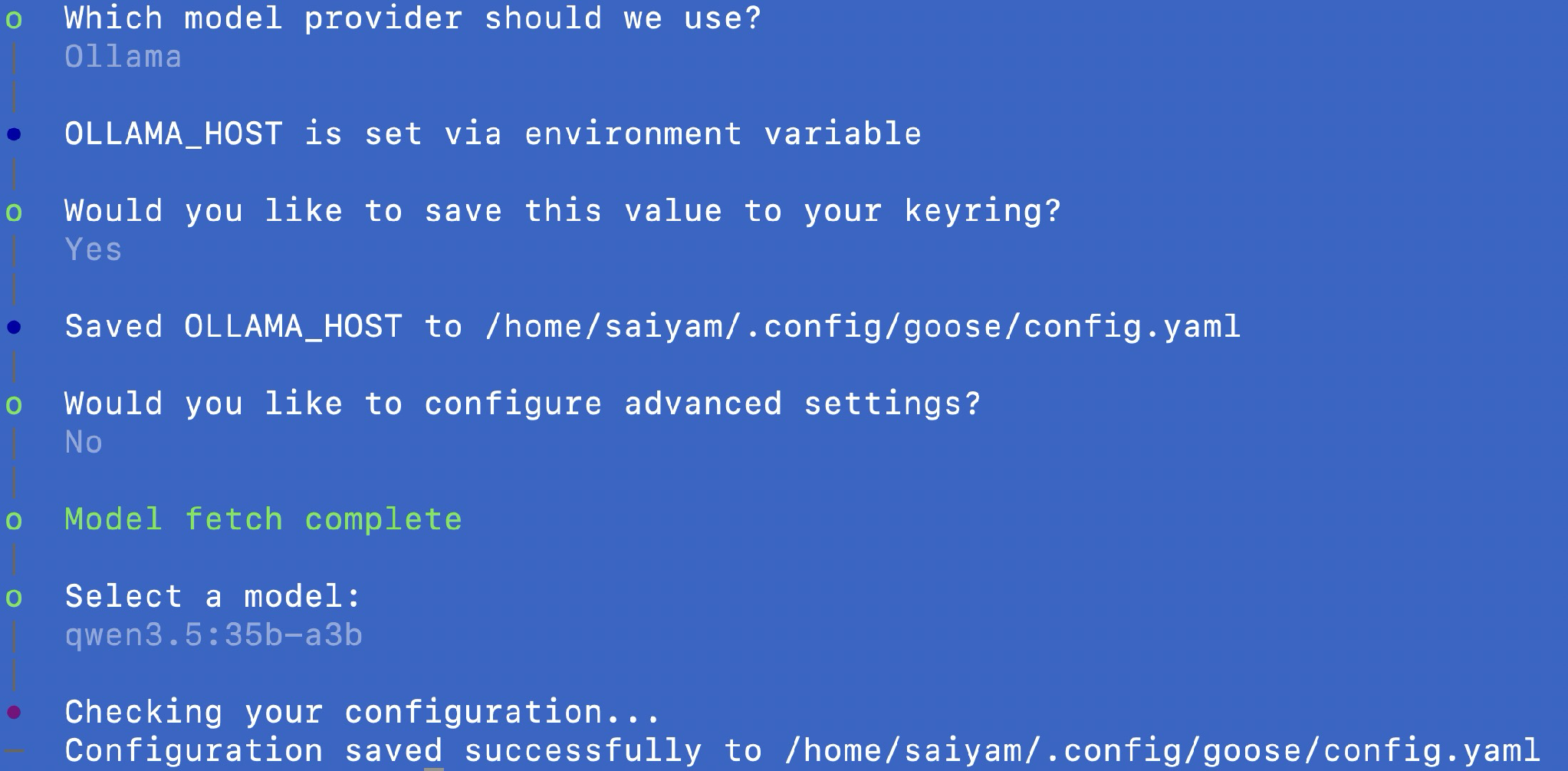
Configuring goose for the local Ollama provider. The default nudges you toward a cloud router; Manual Configuration keeps everything on the box.
That is the entire configuration. No API key, no account, no .env pointing at a cloud endpoint. Goose is now wired to a model that lives entirely on this machine.
Giving it real work
Chat is not the point. The point is an agent that reads, writes, and runs things. So I started a fresh Goose session and gave it a small, deterministic task.
goose session
Create ~/primes.py that prints the first 20 prime numbers, then run it with python3 and show the output.
This time goose did exactly the right thing: it wrote a seven-line script, called the shell to run it, and reported the correct result (2, 3, 5, 7 … 71). That is the full agent loop, write then execute then report, running entirely on local hardware.
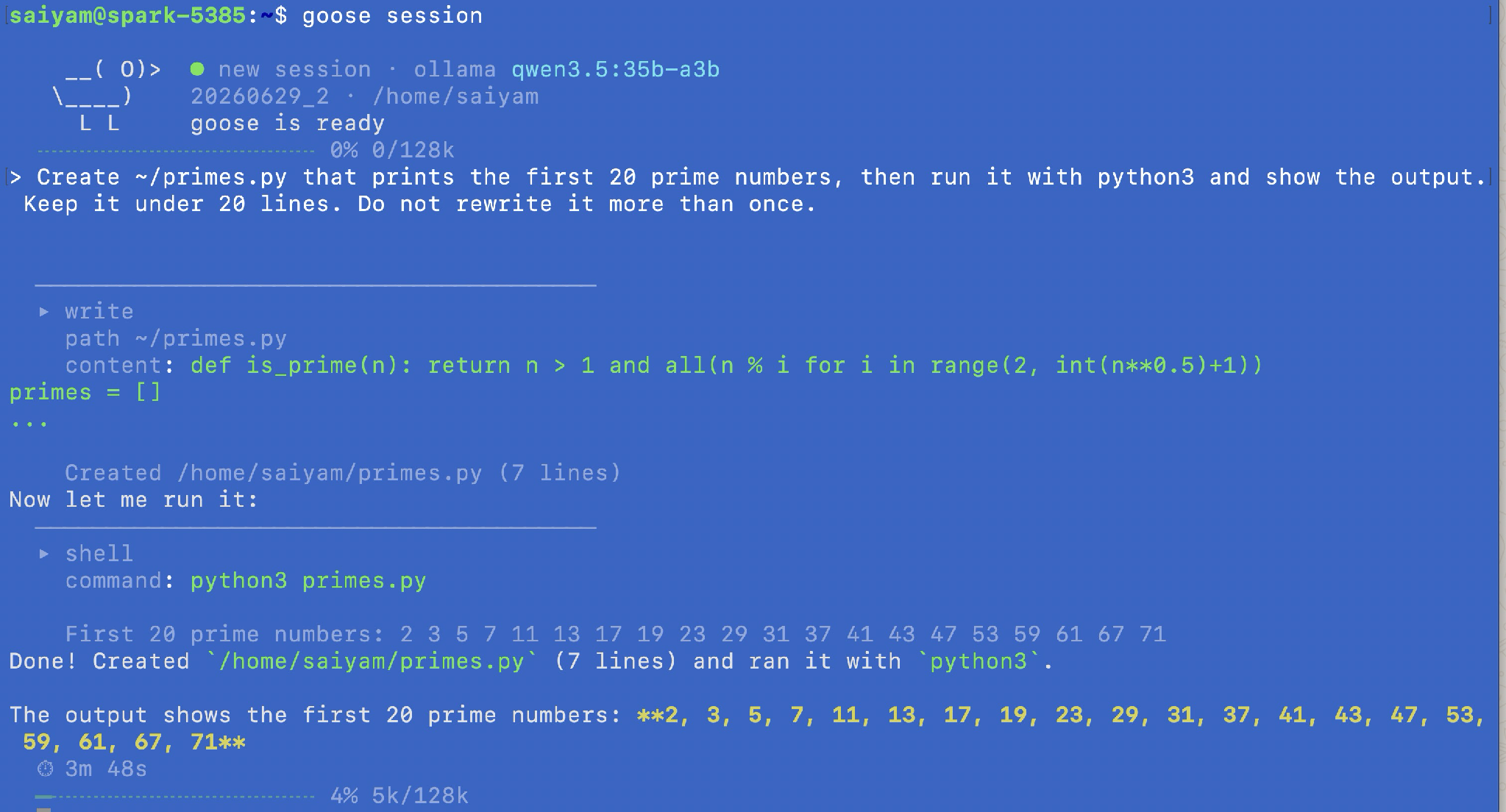 Scoped down to a deterministic task, the agent loop runs cleanly: write the file, run it through the shell, report the result.
The honest takeaway is that a local agent on the Spark is dependable for well-scoped tasks and shaky on long autonomous chains with a model this size. The headline claim of this post, that all of it runs offline, does not depend on that distinction. But it is worth knowing before you point a local agent at something complex.
Proving it stayed offline
This is the headline claim, so it deserves a demonstration rather than an assertion. The clean proof is to show that every network socket in the loop is loopback. While a model is responding, in another terminal:
$ ss -tlnp | grep 11434
LISTEN 0   4096   127.0.0.1:11434   0.0.0.0:*

$ sudo lsof -i -nP | grep -i ollama
ollama     2697   ollama   4u  IPv4   43329   0t0  TCP 127.0.0.1:11434 (LISTEN)
ollama     2697   ollama   7u  IPv4  745810   0t0  TCP 127.0.0.1:11434->127.0.0.1:59280 (ESTABLISHED)
ollama     2697   ollama   8u  IPv4  745811   0t0  TCP 127.0.0.1:11434->127.0.0.1:59292 (ESTABLISHED)
llama-ser  256570 ollama  16u  IPv4  744848   0t0  TCP 127.0.0.1:44777 (LISTEN)
Read it line by line. Ollama listens on 127.0.0.1:11434, not 0.0.0.0, so it is not even reachable from another machine. The two established connections are 127.0.0.1 -> 127.0.0.1: goose talking to Ollama, both ends on the same box. And llama-ser, the model server Ollama spawns to run the weights, is bound to loopback too. Not one socket in the path has a routable address.
The only connection that ever leaves this machine is the SSH session I am using to drive it, and that is incidental: sit down at the Spark with a keyboard and even that disappears. The agent and the model never open a socket that leaves 127.0.0.1. Pull the Ethernet cable mid-task and nothing changes, because there was never anything on the other end to begin with.
The numbers
| Metric | Value |
|---|---|
| Model | qwen3.5:35b-a3b (23 GB on disk) |
| Footprint when loaded (ollama ps) | 29 GB (100% GPU) |
| Raw decode rate (ollama –verbose) | 76.23 tokens/s |
| Time for Goose to write and run the primes task | 3m 48s |
| Peak GPU compute utilization (sm) | ~91% |
| External network calls during the run | 0 |
What this proves, and what it does not
It proves that an agent doing real multi-step work, writing a file, running it through the shell, observing the result, and reporting back, can run end to end on a single desk-sized machine with nothing leaving the box. For anyone in an air-gapped environment, working with sensitive code, or simply not wanting their repository streamed to a third party, this is a usable setup today, not someday.
It does not prove that a local model of this size matches a frontier cloud model. The prime-number task is intentionally small and deterministic. It shows that the local agent loop works, but it does not prove that the same setup will reliably handle long, ambiguous, autonomous workflows.
The honest framing is this: the privacy story is excellent, the workflow is genuinely usable for bounded tasks, and the agentic reliability gap on complex work is still real. The Spark’s 128 GB of unified memory also gives you room to try larger or more capable local models when the task needs it, without changing the local-first architecture.
That combination of an open agent framework, a local-first design, and hardware that finally makes local models practical is what turns “local agent” from a demo into something you would actually run.
Try it yourself
The whole sequence, top to bottom:
1. Confirm the hardware (memory is unified, so read it with free -h)
uname -m && nvidia-smi && free -h
2. Pick a tool-calling model and verify it actually calls tools
ollama list
curl -s http://localhost:11434/api/chat -d '{"model":"qwen3.5:35b-a3b","stream":false,
"messages":[{"role":"user","content":"weather in Paris? use the tool"}],
"tools":[{"type":"function","function":{"name":"get_weather",
"parameters":{"type":"object","properties":{"city":{"type":"string"}}}}}]}' | jq '.message'
3. Install the agent
curl -fsSL https://github.com/aaif-goose/goose/releases/download/stable/download_cli.sh | bash
export PATH="$HOME/.local/bin:$PATH"
goose --version
4. Wire Goose to the local model
goose configure # Manual Configuration -> Ollama -> http://localhost:11434 -> qwen3.5:35b-a3b
5. Give it real work
goose session
6. Prove it stayed offline (second terminal, while a model is responding)
ss -tlnp | grep 11434
sudo lsof -i -nP | grep -i ollama
Goose, MCP, AGENTS.md, and agentgateway are all hosted by the Agentic AI Foundation under the Linux Foundation.