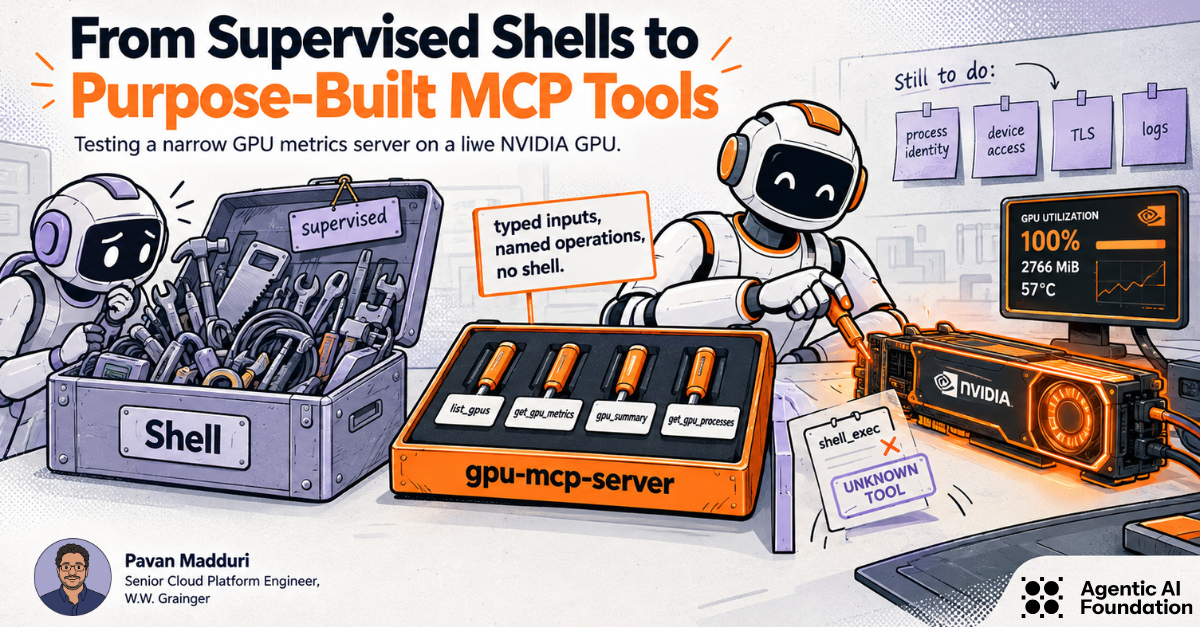

In my previous AAIF article, goose used a supervised Developer shell to collect a read-only Kubernetes inventory. That was a reasonable prototype: the commands were visible and the cloud credentials were read-only. The weak point was still obvious. The shell was much broader than the job.
For this follow-up I moved the restriction into the tool layer. The worked example is gpu-mcp-server, a Go MCP server I maintain that reads NVIDIA GPU data through NVML. I built it in Google Colab, called the tools directly over MCP stdio, exercised the error paths, and ran a short CUDA workload to see what changed under load.
A narrow MCP surface is useful, but it is not the whole least-privilege story. The server process still needs a runtime identity, access to the NVIDIA driver and selected devices, a controlled transport, and logs that do not depend on the model's answer. I treat the tool list as one boundary, not the entire boundary.
| Validation scope |
|---|
| Tested on September 4, 2026, in a Google Colab GPU runtime with one Tesla T4. The source under test was commit 0579aeadba62e782fc5f7c6831b6da74963dfc87 on the main branch; the built binary reported v0.1.0-62-g0579aea. The run covered the repository tests, a local build, NVML startup, MCP tool discovery, live reads, invalid input, an unregistered tool, and process attribution during a CUDA workload. Docker, HTTP transport, Helm, MIG, multi-GPU behavior, and goose model-driven tool selection were not tested in this run. |
A shell is useful while a prototype is taking shape. When something fails, an engineer can run another command and keep digging. That same flexibility is the problem when the shell is exposed to an agent. A request for GPU utilization does not by itself prevent a shell process from reading files, inspecting environment variables, starting another program, or opening a network connection.
Approval prompts and a restricted account reduce risk, but they do not change the shape of the interface. A purpose-built MCP server can narrow that interface. The client sends typed arguments to a named operation, and the server decides which operations exist.
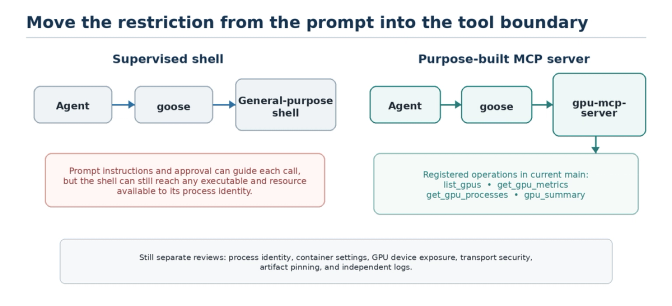
Figure 1. Moving from a shell to a purpose-built MCP server narrows the agent-facing operations. The surrounding process, device, container, identity, and network controls remain separate work.
The tool surface in gpu-mcp-server
The server registers four MCP tools. In the live discovery call, those were the only four names returned. There was no shell, file browser, generic command runner, or write operation in the discovered tool list.
| Tool | Returned data | Operational note |
|---|---|---|
| list_gpus | No input. Returns device count, index, UUID, name, utilization, and memory use. | Good first call for inventory. |
| get_gpu_metrics | Takes an index or UUID. Returns utilization, memory, temperature, power, PCIe/NVLink values, and driver/CUDA versions. | The handler rejects a request with no selector. |
| gpu_summary | No input. Returns aggregate utilization, memory, temperature, power, and device count. | Useful for a node-level view. |
| get_gpu_processes | Optional index or UUID. Returns PID, process name, GPU identity, memory use, and process type. | Useful, but it exposes workload details. |
The repository also documents MIG support. I did not have a MIG-capable setup in this test, so the article does not claim that path was validated.
The process tool deserves separate treatment. GPU UUIDs identify hardware, while PIDs and process names can reveal workload or tenant details. If a workflow only needs inventory and utilization, I would not expose process attribution.
Build and test the server before adding a model
I kept the model out of the first validation loop. A direct MCP client makes it easier to see whether a result came from the server or from model interpretation.
Commands used in the test
git clone https://github.com/pmady/gpu-mcp-server.gitcd gpu-mcp-servergit checkout 0579aeadba62e782fc5f7c6831b6da74963dfc87make testmake build./gpu-mcp-server --version
The repository test target ran with the Go race detector and passed the gpu and server packages. The build produced a 13 MB, 64-bit x86-64 Linux executable. The compiler printed deprecation warnings from NVIDIA's headers, but the tests and build completed successfully.
| Test item | Value |
|---|---|
| Runtime | Google Colab GPU runtime |
| GPU | Tesla T4, 15,360 MiB |
| NVIDIA driver | 580.82.07 |
| Go | 1.25.0 with CGO enabled |
| MCP client | Python mcp package 2.1.1 |
| Transport | stdio |
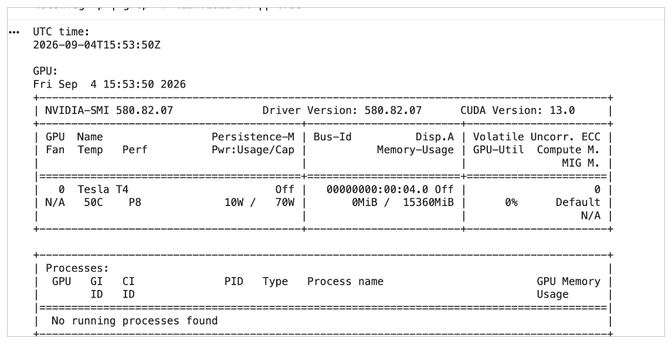
Figure 2. The starting Colab runtime had one idle Tesla T4, driver 580.82.07, and 15,360 MiB of device memory.
A process environment problem showed up immediately
Starting the binary from the shell worked and logged that NVML had initialized. Starting the same binary as a child of the Python MCP client initially failed with ERROR_LIBRARY_NOT_FOUND. Colab keeps the NVML library under /usr/lib64-nvidia, and that path was not available to the child process.
Passing the path through the child process environment fixed the problem:
env = os.environ.copy()
env["LD_LIBRARY_PATH"] = "/usr/lib64-nvidia:" + env.get("LD_LIBRARY_PATH", "")

server = StdioServerParameters(
    command="/content/gpu-mcp-server/gpu-mcp-server",
    args=[],
    env=env,
)
That failure was useful. The MCP schema had not changed, but the server still depended on the host library path. This is exactly why tool scope and deployment scope need separate reviews.
Discover the tools over MCP
After the library path was passed to the child, the client initialized the session and called tools/list. The running server returned four tools and logged a successful NVML initialization.
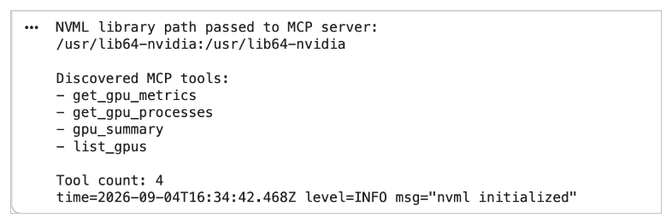
Figure 3. Live MCP discovery returned exactly four tools. The request was made directly over stdio, without a model in the loop.
Read the idle GPU
The first live call was list_gpus. It returned one Tesla T4 with index 0 and 15,360 MiB of total memory. In that sample, the GPU was idle and the server reported 447 MiB in use. The UUID is redacted in the figure.
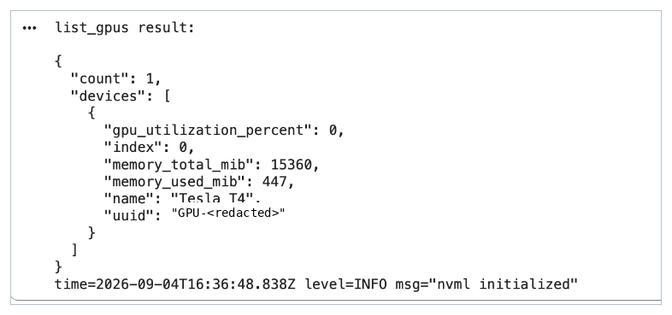
Figure 4. list_gpus returned the live Tesla T4 inventory. The GPU UUID has been redacted.
- get_gpu_metrics: 0% GPU utilization, 447 MiB used, 38 C, 10 W, a 70 W limit, driver 580.82.07, and CUDA compatibility 13.0.
- gpu_summary: one device, 0% average utilization, 15,360 MiB total memory, 38 C maximum temperature, and 10 W total power.
- get_gpu_processes: count 0; the processes field was null in the idle response.
I also checked the stable fields with nvidia-smi in the same runtime. GPU model, driver version, total memory, temperature, and power limit matched. Memory in use changed between samples, which is normal in a notebook because each command observes a different point in time.
One response-shape detail is worth noting: the idle process call returned count 0 and processes: null. That is valid JSON, but clients that always expect an array may prefer an empty list.
Check the error paths
A successful metrics call only proves the happy path. I also sent incomplete input, invalid selectors, and a request for a tool that the server does not register.
| Request | Observed result |
|---|---|
| No index or UUID | Rejected: provide either index or uuid |
| Index 999 | Rejected: Invalid Argument |
| Unknown UUID | Rejected: Not Found |
| shell_exec | Rejected by MCP: unknown tool |
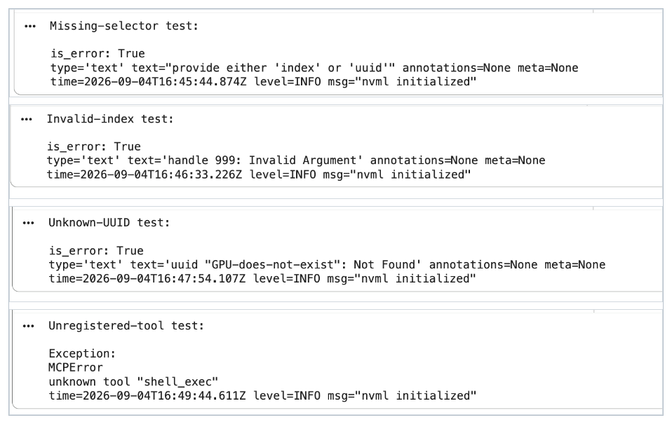
Figure 5. The live server rejected a missing selector, an invalid index, an unknown UUID, and an unregistered shell-style tool.
The shell_exec result is the important distinction from the earlier shell-based prototype. A client can ask for that name, but the MCP server rejects it because the operation was never registered.
Run a real CUDA workload
The idle path was not enough to validate utilization or process attribution. I started a small PyTorch matrix-multiplication workload, kept the tensors allocated, and called get_gpu_metrics and get_gpu_processes while the work was still active.
Workload used for the active sample
a = torch.randn((8192, 8192), device="cuda:0")
b = torch.randn((8192, 8192), device="cuda:0")

for _ in range(5):
    c = torch.matmul(a, b)

torch.cuda.synchronize()
PyTorch reported 776.1 MiB allocated by the test process. During the same run, the MCP metrics call reported 100% GPU utilization, 2,766 MiB of device memory in use, 57 C, and 68 W of power draw.
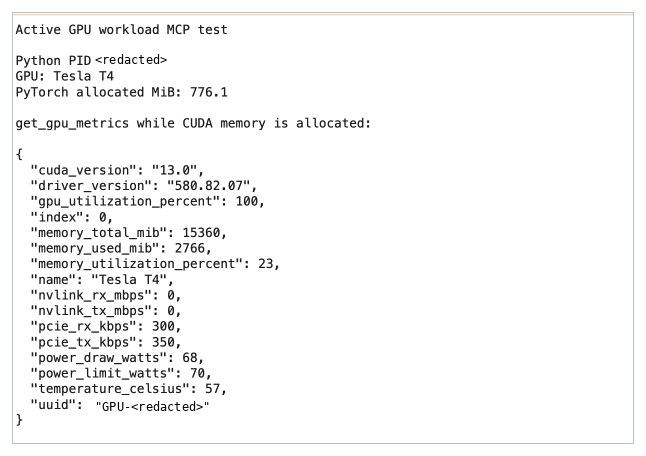
Figure 6. get_gpu_metrics during the CUDA workload. The UUID and local PID are redacted.
The process call returned two Python compute processes, each with 1,158 MiB attributed by NVML. The PID and UUID values are redacted below.
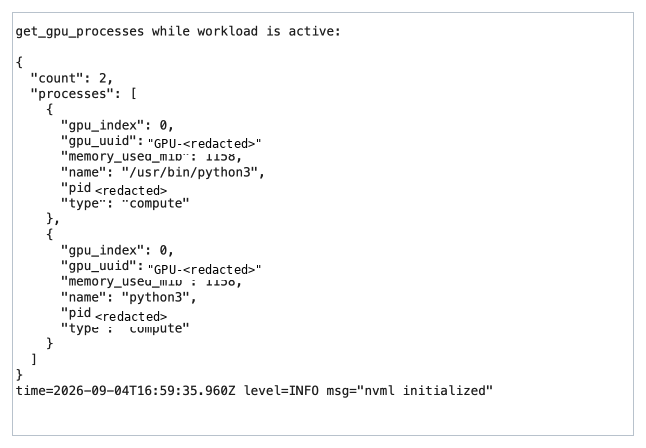
Figure 7. get_gpu_processes returned two active compute processes while the workload was running. PIDs and GPU UUIDs are redacted.
The 776.1 MiB reported by PyTorch and the 2,766 MiB reported by NVML are not the same counter. PyTorch reports memory managed by that process's allocator; NVML reports device-wide use, including CUDA contexts and other GPU processes. Treating those numbers as if they should match would be a measurement error.
These values are one live sample, not a performance benchmark. The point of the workload was to confirm that the server changed from an idle reading to active utilization and returned process records while CUDA work was running.
| Area | Status | Evidence |
|---|---|---|
| Repository tests | Tested | make test passed with the race detector. |
| Local build | Tested | CGO build completed; binary executed and reported its version. |
| NVML startup | Tested | Server initialized NVML against the Colab Tesla T4. |
| MCP stdio | Tested | Direct client initialized, discovered tools, and called them. |
| Live GPU reads | Tested | Inventory, detailed metrics, summary, and process calls returned live data. |
| Bad input | Tested | Missing selector, bad index, bad UUID, and unknown tool were rejected. |
| Active workload | Tested | Utilization and process attribution changed during CUDA work. |
| goose model behavior | Not tested | No model was used to choose or call the tools. |
| Docker, HTTP, Helm | Not tested | Repository files were reviewed, but these deployment paths were not run. |
MIG and multi-GPU behavior were not tested; the Colab runtime exposed one non-MIG Tesla T4.
A narrow tool list is only one layer
The test shows a real improvement over a general-purpose shell: the MCP client discovered four named GPU operations, and an unregistered shell call was rejected. It does not show that the whole deployment is least-privileged.
Process identity and environment
In stdio mode the server runs as a child of the MCP client. It inherits a user, environment variables, filesystem access, and device visibility. The Colab library-path failure was a small example of that dependency. In a production setup I would use a dedicated identity, pass only the environment the server needs, and keep unrelated credentials out of the process.
GPU and container access
The repository's Docker example uses --gpus all, which is convenient for a workstation but broader than many production jobs need. The Dockerfile also does not set a USER. A production image should run as a tested non-root user and expose only the required GPU devices and driver libraries.
The Helm values include useful hardening defaults such as no privilege escalation, a read-only root filesystem, dropped Linux capabilities, and NVIDIA driver capabilities limited to utility. They still default to all visible NVIDIA devices. Device selection and node placement still need to match the intended workload.
Network transport
The binary defaults to stdio and also supports HTTP. Stdio keeps the server local to the client process and does not open a listening port. I did not run the HTTP path. In a source review of the tested revision, the Helm chart defaults the workload to HTTP and creates a ClusterIP Service. The HTTP handler mounts the streamable MCP endpoint and /healthz, but I did not find authentication or TLS configuration in server/http.go or the chart. I therefore treat authentication, TLS termination, network policy, and request logging as deployment requirements rather than built-in controls.
Returned data and logs
The tool contract may be read-only and still expose sensitive operational data. GPU UUIDs identify hardware; process calls reveal PIDs, process names, and memory use. Keep the returned fields as small as the workflow allows, and save the MCP tool list, arguments, structured response, and server logs outside the model-generated answer.
Checks I would carry into another infrastructure MCP server
- Register task-specific operations instead of accepting command strings or generic scripts.
- Use typed inputs and handle missing, ambiguous, or invalid selectors explicitly in each handler.
- Keep read and write paths separate. A read-only server should not carry unused mutation code.
- Limit the process identity, environment, mounts, network path, and visible devices independently from the MCP schema.
- Return only the fields the workflow needs. Treat hardware IDs, PIDs, process names, file paths, and tenant labels as sensitive.
- Record a commit SHA and, where applicable, an image digest for each test run.
- Save the discovered tools, request arguments, structured responses, and server logs as evidence.
- Test missing input, invalid input, unavailable dependencies, empty results, and calls to tools that are not registered.
Conclusion
Moving from a supervised shell to a purpose-built MCP server removed arbitrary shell execution from the agent-facing interface in this test. The server exposed four GPU operations, returned live metrics from a Tesla T4, rejected invalid selectors, and refused an unregistered shell call.
That is a meaningful boundary, but it is not the whole boundary. The server still needed the correct NVIDIA library path and GPU access. Process attribution exposed workload details. Container, HTTP, Helm, identity, and device controls still need separate validation.
My rule after this test is simple: keep the MCP contract narrow, keep the server process narrow, and keep evidence outside the model's answer. When those three line up, the access starts to match the job.
References
1. gpu-mcp-server repository: https://github.com/pmady/gpu-mcp-server
2. README and usage examples: https://github.com/pmady/gpu-mcp-server/blob/0579aeadba62e782fc5f7c6831b6da74963dfc87/README.md
3. MCP tool registration and handlers: https://github.com/pmady/gpu-mcp-server/blob/0579aeadba62e782fc5f7c6831b6da74963dfc87/server/server.go
4. Build and test targets: https://github.com/pmady/gpu-mcp-server/blob/0579aeadba62e782fc5f7c6831b6da74963dfc87/Makefile
5. CLI entry point and transport flags: https://github.com/pmady/gpu-mcp-server/blob/0579aeadba62e782fc5f7c6831b6da74963dfc87/cmd/gpu-mcp-server/main.go
6. Dockerfile: https://github.com/pmady/gpu-mcp-server/blob/0579aeadba62e782fc5f7c6831b6da74963dfc87/Dockerfile
7. Helm chart values: https://github.com/pmady/gpu-mcp-server/blob/0579aeadba62e782fc5f7c6831b6da74963dfc87/deploy/helm/gpu-mcp-server/values.yaml
8. Previous AAIF article: https://aaif.io/blog/building-a-read-only-multi-cloud-kubernetes-inventory-with-goose
About the author
Pavan Madduri is a Senior Cloud Platform Engineer at W.W. Grainger, Inc., working on Kubernetes, GPU and AI infrastructure, observability, and agent automation. He maintains gpu-mcp-server, is a CNCF Golden Kubestronaut, and serves as a Tech Lead for CNCF TAG Workloads Foundation.
GitHub: github.com/pmady/gpu-mcp-server | LinkedIn: linkedin.com/in/pavanmadduri
Share
Author

Pavan Madduri
Senior Cloud Platform Engineer, Grainger