
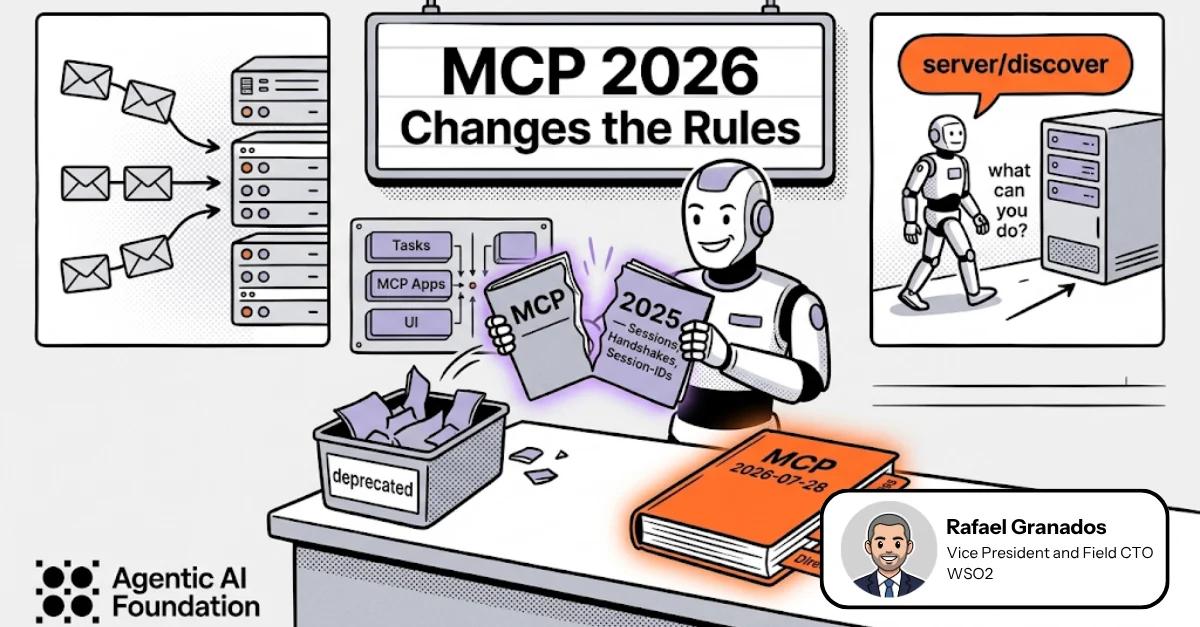

When a model has no tools, the pattern repeats: it suggests a list of steps and you become its hands, executing them one by one (“open the calendar…”, “find the document…”, “create the ticket…”, “run the pipeline…”, “send the email…”, “update the CRM…”).
And because the model isn’t seeing what’s really happening, it works with incomplete context: it infers missing state, interprets ambiguously, and can even drive your workflow into a false branch that costs hours.
In the end, the AI doesn’t speed you up; it adds a layer of coordination and verification that consumes time and effort.
To address this issue, Anthropic introduced MCP in 2024 to connect AI applications with external systems.
The latest version, https://modelcontextprotocol.io/specification/2026-07-28, marks a break with the standard we’ve known until now, particularly for deployments that need to scale across multiple server instances and load balancers.
After spending some time digging into this new spec, these are the three changes I see as the most impactful:
MCP is now stateless: no protocol-level sessions.
Before, the client and server negotiated the protocol version and capabilities during initialization, and a Streamable HTTP server could optionally maintain a protocol-level session across requests. Now, each request carries the protocol metadata needed for the server to process it independently.
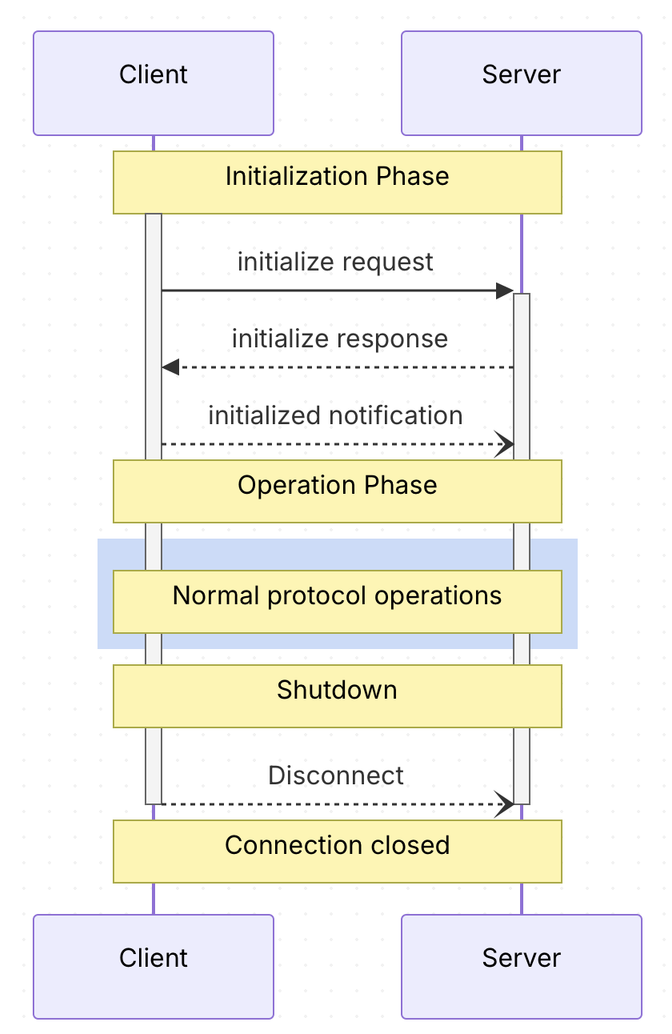
MCP 2025-11-25 lifecycle
The old lifecycle required a dedicated initialization phase before normal protocol operations could begin. The client and server negotiated the protocol version and capabilities, and a Streamable HTTP server could optionally create a session for subsequent requests.
Before (with an HTTP session)
Step 1: Client initializes the connection. If the server creates a session, it returns an MCP-Session-Id header that the client must include on subsequent requests.
# Step 1: Initialize → server may return a session ID in the response header
curl -i -X POST http://localhost:3000/mcp \
  -H "Content-Type: application/json" \
  -H "Accept: application/json, text/event-stream" \
  -d '{
    "jsonrpc": "2.0",
    "id": 1,
    "method": "initialize",
    "params": {
      "protocolVersion": "2025-11-25",
      "capabilities": {},
      "clientInfo": {
        "name": "curl-client",
        "version": "1.0.0"
      }
    }
  }'
# Response headers include:
# MCP-Session-Id: c4c80108-47cf-47b2-ac06-f0dd60398e10
Step 2: List tools → if a session ID was returned, it MUST be included in the header
# Step 2: List tools → if issued, session ID must be included
curl -X POST http://localhost:3000/mcp \
  -H "Content-Type: application/json" \
  -H "Accept: application/json, text/event-stream" \
 -H "MCP-Protocol-Version: 2025-11-25" \
  -H "Mcp-Session-Id: c4c80108-47cf-47b2-ac06-f0dd60398e10" \
  -d '{
    "jsonrpc": "2.0",
    "id": 2,
    "method": "tools/list"
}'Step 3: If a session ID was issued, tool calls also include it. If the server handling the request does not recognize the session, the request fails.
# Step 3: Call tool → if issued, same session ID required
curl -X POST http://localhost:3000/mcp \
  -H "Content-Type: application/json" \
  -H "Accept: application/json, text/event-stream" \
  -H "MCP-Protocol-Version: 2025-11-25" \
  -H "Mcp-Session-Id: c4c80108-47cf-47b2-ac06-f0dd60398e10" \
  -d '{
    "jsonrpc": "2.0",
    "id": 3,
    "method": "tools/call",
    "params": {
      "name": "search_docs",
      "arguments": { "query": "MCP spec" }
    }
  }'
New Spec - Stateless (2026-07-28)
# Every request is self-contained; no session headers neededcurl -X POST http://localhost:3000/mcp \
-H "Content-Type: application/json" \
-H "Accept: application/json, text/event-stream" \
-H "MCP-Protocol-Version: 2026-07-28" \
-H "Mcp-Method: tools/call" \
-H "Mcp-Name: search_docs" \
-d '{
"jsonrpc": "2.0",
"id": 1,
"method": "tools/call",
"params": {
"name": "search_docs",
"arguments": {
"query": "MCP spec"
},
"_meta": {
"io.modelcontextprotocol/protocolVersion": "2026-07-28",
"io.modelcontextprotocol/clientInfo": {
"name": "curl-client",
"version": "1.0.0"
},
"io.modelcontextprotocol/clientCapabilities": {}
}
}
}'
Every request is self-contained; no session headers needed
The server no longer needs to rely on protocol-level state from an earlier request. It validates the current request and processes it independently.
This makes it easier to scale horizontally, add load balancers, and rotate server instances without keeping session state in sync.
Extensions framework: add capabilities without complicating the protocol
With the previous approach, many capabilities were part of the core protocol. This made the protocol larger and increased the amount of functionality that implementations had to understand and maintain, even when they only needed a small subset.
The new approach formalizes how additional capabilities can be handled as optional, versioned extensions. If you wanted MCP to do something extra, it no longer had to become part of the core specification.
Extensions existed before the 2026 release, but this version formalizes the extensions framework and makes it easier to evolve independently from the core protocol. Capabilities such as Tasks and MCP Apps can now be defined as explicitly versioned extensions rather than as part of the core specification.
Before: capabilities in the core
In the previous approach, client capabilities were negotiated during the initialization handshake, while other capabilities were defined within the core protocol.
# MCP 2025-11-25 initialization request.
# The client advertises its capabilities during the initialization handshake.curl -X POST http://localhost:3000/mcp \
-H "Content-Type: application/json" \
-H "Accept: application/json, text/event-stream" \
-d '{
"jsonrpc": "2.0",
"id": 1,
"method": "initialize",
"params": {
"protocolVersion": "2025-11-25",
"capabilities": {
"roots": {
"listChanged": true
},
"sampling": {},
"elicitation": {}
},
"clientInfo": {
"name": "example-client",
"version": "1.0.0"
}
}
}'
The initialize request advertises the capabilities supported by the client. Server capabilities —such as tools, resources, prompts, and logging— are returned in the initialization response.
Now: optional, versioned extensions
The new extensions framework keeps the MCP core small and focused. Advanced capabilities do not need to be added directly to the base protocol; instead, they are defined as separate, optional extensions with their own identifiers and versions.
Clients and servers explicitly declare which extensions they support. This allows a tools-only implementation to remain simple, while another implementation can opt into advanced functionality —such as Tasks or MCP Apps—only when needed.
In the code snippet below, the client calls the get_weather tool and declares support for the optional io.modelcontextprotocol/ui extension. The following snippet shows the relevant part of the request, including the client's extension declaration:
"method": "tools/call",
"params": {
  "name": "get_weather",
  "arguments": {
    "location": "New York"
  },
  "_meta": {
    "io.modelcontextprotocol/clientCapabilities": {
      "extensions": {
        "io.modelcontextprotocol/ui": {
          "mimeTypes": [
            "text/html;profile=mcp-app"
          ]
        }
      }
    }
  }
}
The MCP Apps UI extension tells the server that the client can display an interactive interface, not just text or JSON. For example, the weather tool could show a forecast card, a chart, or a map.
The get_weather tool itself links to the interactive UI through its metadata.
The following tool definition explicitly points to the ui://weather-dashboard resource:
{
  "name": "get_weather",
  "description": "Get the weather for a location",
  "inputSchema": {
    "type": "object",
    "properties": {
      "location": {
        "type": "string"
      }
    },
    "required": [
      "location"
    ]
  },
  "_meta": {
    "ui": {
      "resourceUri": "ui://weather-dashboard"
    }
  }
}
When the client invokes the get_weather tool, the host uses the resource URI declared in the tool metadata to retrieve and render the HTML as an interactive MCP App. The associated UI resource can be returned with the MCP Apps MIME type:
{
  "jsonrpc": "2.0",
  "id": 2,
  "result": {
    "contents": [
      {
        "uri": "ui://weather-dashboard",
        "mimeType": "text/html;profile=mcp-app",
        "text": "<!doctype html><html><body><main id=\"weather-app\"></main><script type=\"module\">/* renders the weather dashboard */</script></body></html>"
      }
    ]
  }
}
This example shows how MCP extensions work in practice. Implementations can adopt the extensions they need while the core remains small and focused.
Direct discovery: no session handshake
With previous MCP revisions, a client began by sending an initialize request and completing initialization before normal operations. During that exchange, the client and server agreed on a protocol version and supported features. Streamable HTTP servers could also use an optional session ID across later requests.
MCP 2026-07-28 changes this model. There is no session handshake or protocol-level session to maintain. Instead, every request includes the protocol version and the client capabilities the server needs to process it.
As in the previous sections, the difference is easier to see by comparing the old and new approaches side by side.
Before: initialization as discovery
In MCP 2025, the client had to start by sending an initialize request. The server returned its supported protocol version, capabilities, and server information as part of the initialization response. Let's take a look at an example request.
{
  "jsonrpc": "2.0",
  "id": 1,
  "method": "initialize",
  "params": {
    "protocolVersion": "2025-11-25",
    "capabilities": {
      "roots": {
        "listChanged": true
      },
      "sampling": {},
      "elicitation": {
        "form": {},
        "url": {}
      },
      "tasks": {
        "requests": {
          "elicitation": {
            "create": {}
          },
          "sampling": {
            "createMessage": {}
          }
        }
      }
    },
    "clientInfo": {
      "name": "ExampleClient",
      "title": "Example Client Display Name",
      "version": "1.0.0",
      "description": "An example MCP client application",
      "icons": [
        {
          "src": "https://example.com/icon.png",
          "mimeType": "image/png",
          "sizes": ["48x48"]
        }
      ],
      "websiteUrl": "https://example.com"
    }
  }
}
The server returned its capabilities and server information in the initialization response. The client then sent an initialized notification before normal operations could begin.
The client’s capabilities object described what the client could do on the server’s behalf. In this example, it supports roots, sampling, and elicitation.
The server’s capabilities object described what the server could provide to the client. In this example, it exposes tools, resources, prompts, logging, and task-related operations. These are different from client capabilities: the server does not return elicitation because elicitation is performed by the client, on behalf of the server.
{
  "jsonrpc": "2.0",
  "id": 1,
  "result": {
    "protocolVersion": "2025-11-25",
    "capabilities": {
      "logging": {},
      "prompts": {
        "listChanged": true
      },
      "resources": {
        "subscribe": true,
        "listChanged": true
      },
      "tools": {
        "listChanged": true
      },
      "tasks": {
        "list": {},
        "cancel": {},
        "requests": {
          "tools": {
            "call": {}
          }
        }
      }
    },
    "serverInfo": {
      "name": "ExampleServer",
      "title": "Example Server Display Name",
      "version": "1.0.0",
      "description": "An example MCP server providing tools and resources",
      "icons": [
        {
          "src": "https://example.com/server-icon.svg",
          "mimeType": "image/svg+xml",
          "sizes": ["any"]
        }
      ],
      "websiteUrl": "https://example.com/server"
    },
    "instructions": "Optional instructions for the client"
  }
}
So, once initialization has completed successfully, the client must send an initialized notification to confirm that it is ready for normal protocol operations.
{
  "jsonrpc": "2.0",
  "method": "notifications/initialized"
}
To find out what the server could do, the client first had to complete the mandatory initialization process. There was no alternative path: it could only start using the server normally after initialization was complete.
Now: capability discovery without initialization
In MCP 2026, a client can use server/discover to ask the server which protocol versions and capabilities it supports.
The request carries the protocol version, client information, and client capabilities in _meta. No session is needed for this exchange
{
  "jsonrpc": "2.0",
  "id": "discover-1",
  "method": "server/discover",
  "params": {
    "_meta": {
      "io.modelcontextprotocol/protocolVersion": "2026-07-28",
      "io.modelcontextprotocol/clientInfo": {
        "name": "ExampleClient",
        "version": "1.0.0"
      },
      "io.modelcontextprotocol/clientCapabilities": {}
    }
  }
}
The server responds with the protocol versions, capabilities, and identity it supports
{
  "jsonrpc": "2.0",
  "id": "discover-1",
  "result": {
    "resultType": "complete",
    "supportedVersions": [
      "2026-07-28"
    ],
    "capabilities": {
      "tools": {},
      "resources": {}
    },
    "_meta": {
      "io.modelcontextprotocol/serverInfo": {
        "name": "ExampleServer",
        "version": "1.0.0"
      }
    },
    "instructions": "This server provides weather and resource utilities.",
    "ttlMs": 3600000,
    "cacheScope": "public"
  }
}
The client can use this information to choose a compatible protocol version and continue with normal requests. Unlike the old initialize flow, this does not create a session and does not require a follow-up notifications/initialized message.
Calling server/discover is not mandatory for clients. They can also send another MCP request directly, as long as it includes the protocol version and client capabilities required by the new protocol.
In summary, these are, in my view, the most important changes in MCP 2026: a stateless core, optional extensions, and discovery without a session handshake. Together, they make the protocol easier to scale and easier to evolve.
Share
Author

Rafael Granados
Vice President and Field CTO, WSO2