


A deep dive into the keynote by Ido Salomon & Liad Yosef at MCP Dev Summit North America 2026
Ido Salomon and Liad Yosef opened their keynote with something that felt almost like an apology: they’d built the talk the day before, and it might already be out of date. And they might have been right.
Four months ago, MCP apps didn’t exist as an official standard. Today, it’s shipping inside Claude, ChatGPT, VS Code, Cursor, GitHub Copilot, Postman, and Goose. OpenAI has adopted MCP apps as the standard way for third-party developers to build interactive experiences inside ChatGPT. The talk felt less like a product announcement and more like a live dispatch from the frontier, complete with eye-popping demos of dashboard and app UX iterations made possible by MCP apps.
From Text-based Agentic Output to Richer UX
Receiving only text from AI Agents is an extremely limiting visual and application experience. For example, if you ask an AI agent about your product funnel and you get a wall of text, the wall is overwhelming – and almost completely useless for actually understanding what’s happening. This is the reality even if the text is accurate and informative. A picture is often worth a thousand words. So even if the information is there, the text-dense interface is wrong for human consumption and interaction.
The problem runs deeper than aesthetics. For companies connecting their products to AI systems through MCP, text responses have a hidden cost. They strip away visual and brand identity. Every SaaS product has a brand, a design language, a way of presenting information that users recognize and trust. When a tool returns plain text, all of that disappears. The product becomes a boring, flat database. The user experience becomes someone else’s problem.
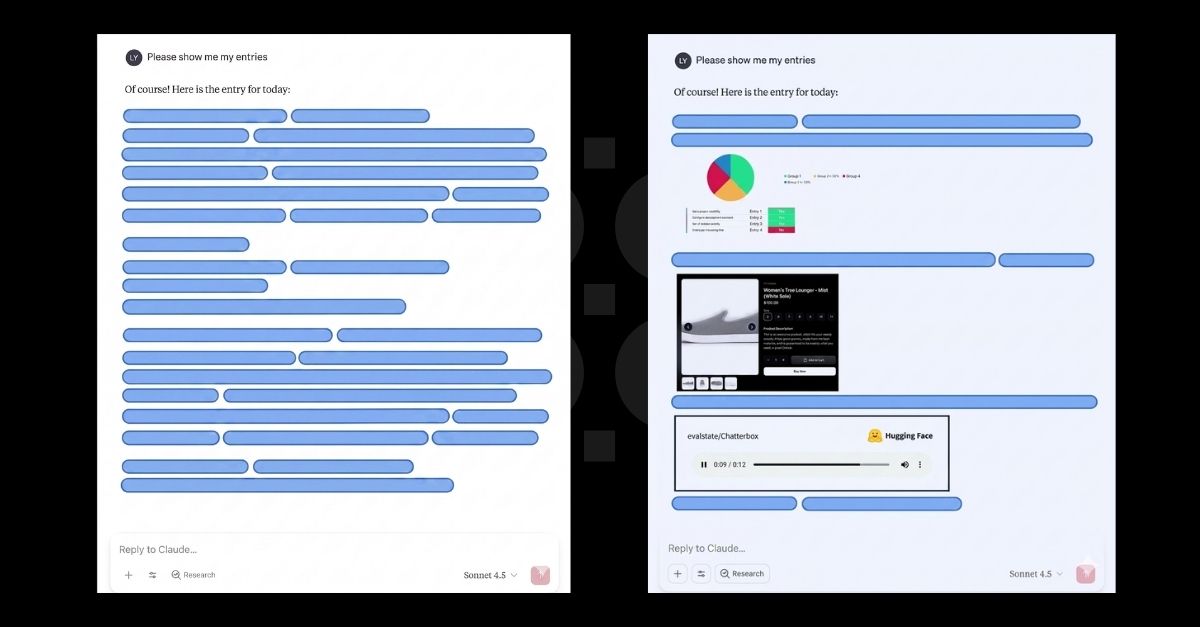
MCP apps is Ido and Liad’s answer to both problems at once and they demonstrated super impressive progress in their keynote. Take a look at the images below. These are only crude examples but useful, nonetheless. The first image shows what most AI agents return today: a block of text. The second is what MCP apps make possible: the tool’s own interface, delivered directly into the chat. It’s branded, familiar, and alive. What’s cool about it is that it is not a static interface, it responds to clicks, triggering new model interactions. They are, in every meaningful sense, real applications but generative in the true sense. Each user might get a slightly different (or very different) user experience based on their taste and needs. The canvas is limited only by the graphical generation capabilities of the LLM and the agentic layer.
How MCP apps Works
According to Ido and Liad, the architecture behind this shift is actually far simpler than it first appears.
- From Text to HTML: They explain that when a tool is called in MCP today, it typically returns plain text. With MCP apps, the tool instead points to an HTML resource—one that can be generated on the fly or pulled from a cache.
- The Host’s Role: Whether the user is in Claude, VS Code, or ChatGPT, the host fetches that resource and renders it as a fully interactive component. This allows the user to see a real UI, built and branded by the tool’s creator, living directly inside their AI interface.
The Interaction Loop
Ido and Liad emphasize that the most crucial design decision involves where the interaction loop lives.
“When a user clicks something inside one of these components, the event doesn’t go directly back to the tool’s server. It goes back to the host, which routes it back through the model.”
By keeping the model in the loop, the agent stays fully aware of every action. It can respond, call additional tools, or update the UI in real-time. The result is a seamless experience where the user never has to type a command or switch tabs to get things done.
Four Months of Building the Spec in Public
Ido created MCPUI independently, exploring what it would look like to send a UI over MCP. The idea gained real momentum when OpenAI released their Apps SDK four days after an early summit where the MCPUI concept had struggled to get traction. Suddenly the most widely used AI host in the world had interactive applications and people took notice.
Anthropic, OpenAI, and the MCPUI team came together to formalize the spec. A draft landed a month later. Two months after that, Claude and VS Code shipped official support. Today the ecosystem includes VS Code, Cursor, GitHub Copilot, Claude, ChatGPT, Postman, and Goose, all following the same standard. The official SDK, called ext-Apps, means developers write their app once and it runs in all of them.
What’s Being Built Next
The spec is still young and the roadmap is moving fast but two new capabilities are top of mind for Ido and Liad.
The first issue is reusable views. Right now, each tool call replaces the current UI with a newly rendered one. That may be fine for simple interactions, but it becomes disruptive in dense, information-rich applications such as Autodesk or Google Analytics dashboards. To address this, the team is exploring App Tools, a proposal that would let the agent interact with an existing UI more like a human would, instead of repeatedly replacing the entire view.
The second issue is the balance between generative UI and predefined UI. Claude’s recently introduced generative UI feature already runs on top of MCP apps, which shows that both third-party branded interfaces and first-party AI-generated interfaces can exist within the same framework. At the same time, the working group is trying to ensure interoperability with efforts such as AGUI and WebMCP, with the goal of connecting these different approaches rather than setting them against one another.
You, Too, Can Help Shape the UX Layer for MCP!
No, really. The spec is young and there remains so much work to be done in many ears. As Liad said at the talk, “You can actually be a part of how this protocol is coming to life.” The MCP apps spec working group meets every three weeks and takes input from host builders, server builders, and community contributors. The question of what to even call the small UI components, was settled by a community survey.
The spec will keep evolving. The working group will keep meeting. And the people who show up and contribute will have a real say in what gets built. For anyone building on top of AI hosts, now is the time to step up and shape the future (and, hopefully, learn a lot)
MCP apps is an open standard. The working group meets publicly every three weeks. You can find the spec, the SDK, and the community at the official MCP apps repository. If you’re building an MCP server and want to add a rich interface to it, the place to start is ext-apps.