



You don't need to fully understand how MCP works to feel how useful it is: add an MCP server to a compatible client and presto! – your agent gets new capabilities.
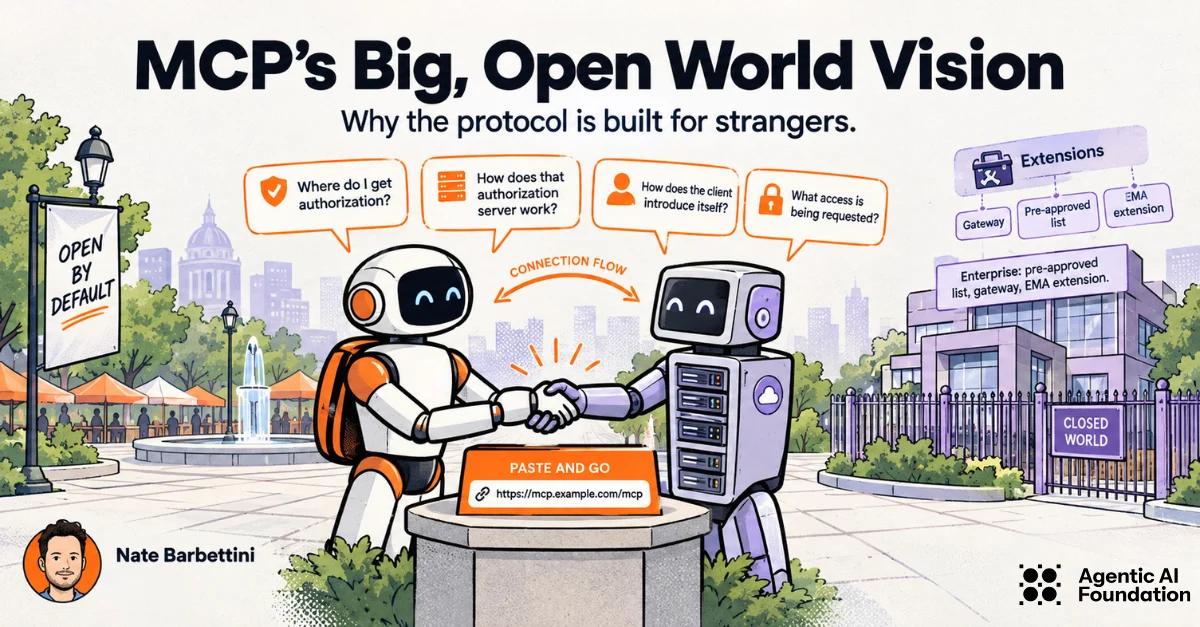
The ability to "paste a URL and go" is more foundational than it may appear. MCP's big vision is that clients and servers that have never met can talk to each other. A client developer shouldn’t need to build a custom integration for every server, and a server operator shouldn’t need to pre-register every client. Clients and servers can be strangers. The protocol gives strangers a shared way to connect, even when access still requires signing in, consent, or approval.
I'll call these open-world integrations: connections where the client and server don't need a pre-existing relationship.
This vision is sometimes misunderstood, because not all MCP servers actually need to handle clients that are strangers! In this post, I'll explain why MCP works this way, when MCP builders do (and don't) need to care, and what it means for the core protocol.
No prior relationship, by default
By default, MCP doesn't assume a prior relationship between the client (agent) developer and the server operator. SEP-991 describes the technical vision like this:
MCP's value comes from its ability to connect arbitrary clients and servers, making the 'no pre-existing relationship' case critical to address.
In plain terms, it means I can tell my agent to connect to https://mcp.linear.com/mcp, and the client can follow a standard connection flow even if that server has never heard of my agent before. My agent doesn't need to have special code to handle Linear's MCP server - it just has code to connect to MCP servers generally.
This is exactly how web browsers work! When you type https://microsoft.com into Chrome or Firefox, you expect to browse that site without pre-configuring anything. You just type the URL and go.
MCP isn't only for open-world integrations (more on that below), but open-world is the default stance for the protocol. But why?
By designing for open-world integrations first, MCP prioritizes:
- a simple end-user experience: just "paste and go", without complicated setup steps that vary by server
- the ability for agents, when permitted, to discover and use MCP servers on their own
Because of this, MCP needs a standard way for clients and servers to learn information about each other.
Discovering the open world
“Paste and go” is only simple for the user if clients and servers can figure out how to interact even when they are strangers. When the two sides have no pre-existing relationship, details that a custom integration might hard-code must be discoverable instead.
For a protected server, that means answering a few questions:
Where do I get authorization? The MCP server tells the client where to find its authorization information, including which authorization server governs access. The client shouldn't have to guess where to send the user to sign in.
How does that authorization server work? The client discovers the endpoints it needs to request access. It can follow a standard flow without special consideration for this particular server.
How does the client introduce itself? The authorization server needs information about a client it may never have encountered before. Client ID Metadata Documents (CIMD) let a client identify itself with a URL where the authorization server can retrieve that information, instead of requiring the client developer to register manually with every service.
What access is being requested? The client requests authorization for the intended MCP server and the access it needs. The server can then apply its policies and, where required, ask the user to sign in and approve access.
Discovery doesn't guarantee admission. A server can recognize how a client is introducing itself and decline to let it in. The key point is that discovering the answers to these questions follows a common pattern, so neither side needs a custom integration just to have the conversation.
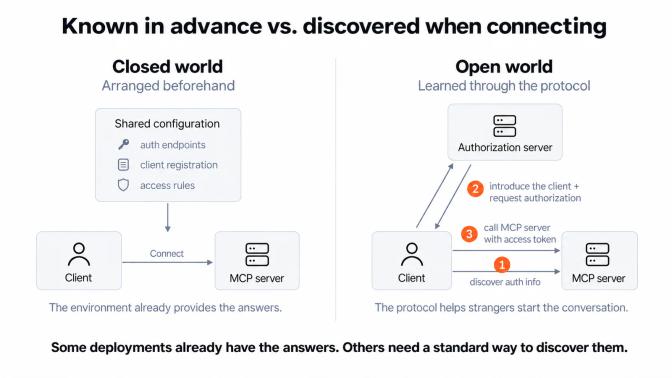
Does every MCP deployment need to discover all of this from scratch? No! In an enterprise environment, some of those answers may already be known.
MCP extensions for the closed world
Inside many enterprises that are adopting MCP, the integration problems are different. Enterprises often have:
- a list of MCP servers pre-approved by IT
- a gateway to manage and control MCP connections
- enterprise authorization systems to govern MCP
- telemetry, logging, and observability of MCP traffic
Some (or all) of the constraints that MCP solves for in the open world of the internet may not apply in the same way to intranets or closed enterprise environments. That's especially true when you control both sides (client and server) of the MCP connection. An enterprise can also use open-world integrations; what matters is which relationships can be assumed:
| Open World (default) | Closed World | |
|---|---|---|
| Prior relationship | Not required | Arranged in advance |
| Shared identity or access-control system | Not assumed | Often provided by the organization |
| What a connection can rely on | Only the shared protocol, without prior coordination | The shared protocol plus arrangements made in advance |
If you're building in a more closed environment, designing for strangers may feel like overkill. You might be right, especially when one or both sides of the connection are pre-configured! The questions that strangers need to ask each other may already have known answers inside your company. In that case, you have more flexibility to choose security and authorization patterns that make sense for your system.
For example, MCP supports client pre-registration, and MCP extensions like Enterprise-Managed Authorization and OAuth Client Credentials can be used when the client and the relevant identity or authorization servers support them.
Keeping both kinds of environments in mind matters when we're deciding what belongs in the core protocol. A custom client you've built might already know about your company's identity provider, or send special headers to your enterprise gateway. A client built by someone who's never heard of your company won't know any of that.
So when someone proposes a new requirement for MCP, I like to ask: What is a general-purpose client meant to do with this?
If the answer starts with "First, configure the client for our environment...", that might be a useful feature for your deployment! But it can't be a prerequisite for every MCP integration. The core protocol needs to work by default when those arrangements haven't happened. Extensions give developers a way to build on those extra arrangements without forcing everyone else to share them.
Conclusion
MCP's big vision is that the arrangements that historically would have been hard-coded per integration don't have to be hard-coded. A server developer can build for clients they've never heard of, and a client developer can support servers that don't exist yet. That's the design intent behind "paste and go", and why the core protocol needs to give strangers a shared way to start the conversation.
Solving for open-world (no prior relationship) integrations by default enables the "paste and go" experience, but it's also true that not all MCP systems fit this mold. That's why MCP extensions are important: they provide alternatives without forcing the core protocol to change.
Share
Author