
Authentication, a shared token budget, health-based failover, and usage metrics for self-hosted models: one binary, one YAML file, no Kubernetes required.
TL;DR: A model server listening on a port is useful, but a shared service also needs an intentional access layer. This post takes a stock Ollama setup on an NVIDIA DGX Spark and, with standalone agentgateway, adds named models behind one endpoint, per-consumer API keys, a shared token-metered rate limit, health-based failover, and per-model usage metrics. The commands and formatted outputs below were captured from the machine.
Local models have become practical for privacy-sensitive work, cost control, experimentation, and disconnected environments. That might mean a MacBook with Ollama, a homelab GPU rig, or, in my case, a DGX Spark sitting on the desk.
Many local deployments begin with the same setup: a model server listening on a port, with nothing in front of it.
That's fine for the first week. Then reality shows up:
- No auth. Anyone who can reach the endpoint can use the GPU. The default model endpoint cannot distinguish an editor, an internal agent, or another device on the network.
- No accounting. Which app burned through the GPU all afternoon? What did that agent loop actually consume? Nobody knows. The server logs requests, not consumers.
- No resilience. Model processes restart (they do), and every app pointed at the port breaks at once. There is no "try something else"; the port is the architecture.
This is the same access and governance problem that appears whenever a useful endpoint becomes a shared service. The established API pattern applies here too: put a gateway in front.
A local model isn't infrastructure until it has a front door.
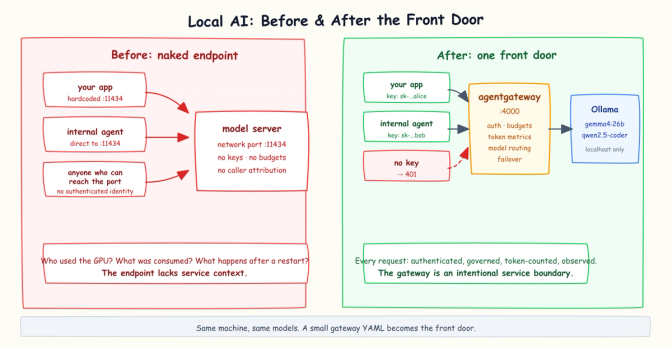
Before: clients directly reach an unauthenticated model-server port. After: clients authenticate through agentgateway while Ollama remains localhost-only.
This post builds that front door, step by step, on a DGX Spark. The architectural pattern is portable to laptops and other model hosts, although provider configuration, model names, and process management vary. By the end: named models behind one endpoint, per-person API keys, a shared token budget that returns 429s, per-model usage metrics, and health-based routing to a backup after a primary failure is detected. The final example remains one compact YAML file. Every formatted output below was captured from the machine with the accompanying command.
Why agentgateway (and what it is)
agentgateway is an open source, AI-native proxy: a Rust data plane hosted by the Agentic AI Foundation (AAIF), under the Linux Foundation. It can also serve as the AI data plane for kgateway. What matters for this post is that it parses AI traffic rather than only forwarding bytes. It speaks the OpenAI API (and Anthropic's, and others), which means it can count tokens, enforce token-based limits, route by model name, and attach authenticated-caller metadata to telemetry when configured. The same data plane handles LLM, MCP, and agent-to-agent (A2A) traffic; this post uses the LLM side.
Most people meet agentgateway in Kubernetes, wired up through the Gateway API. But it has a second mode that fits local AI well: standalone. One binary, one YAML file, no cluster, no CRDs, no Helm. That's the mode used here, because nobody should need a Kubernetes cluster to put auth on a local model.
One more thing worth knowing: for LLM use cases, standalone agentgateway offers a simplified config schema that starts with a top-level llm: block. The routing examples in this post fit in it.
The hardware (briefly)
The DGX Spark is NVIDIA's desktop AI box: GB10 Grace Blackwell, 128 GB of unified memory, small enough to sit under a monitor. Ollama sees it as one very large device:
inference compute id=0 library=CUDA name=CUDA0 description="NVIDIA GB10"
  driver=13.0 type=iGPU total="121.7 GiB" available="114.1 GiB"
vram-based default context: total_vram="121.7 GiB" default_num_ctx=262144
That's 121.7 GiB of unified memory visible to Ollama, with 114.1 GiB available at startup, and a default context window of 262k tokens. The relevant Ollama startup fields above are wrapped and stripped of timestamp/log prefixes. The box already had a small zoo installed; this abbreviated inventory keeps only model names and sizes:
NAME                       SIZE
qwen2.5:3b                 1.9 GB
llama3.1:8b                4.9 GB
gemma4:26b                 17 GB
qwen2.5-coder:7b           4.7 GB
qwen2.5vl:7b               6.0 GB
nemotron-3-super:latest    86 GB
qwen3.5:35b-a3b            23 GB
For this walkthrough I'm serving models with Ollama: gemma4:26b as the general model and qwen2.5-coder:7b for code. The architecture is not Spark-specific, but provider configuration is model-server-specific, while process and hardware details vary by host. Ollama is a first-class agentgateway provider; OpenAI-compatible servers such as vLLM, llama.cpp, and LM Studio can use the custom provider, with their own base URLs and model behavior.
Step 0: the naked endpoint (the problem, demonstrated)
Ollama serves an OpenAI-compatible API on port 11434. The endpoint works:
curl -s http://localhost:11434/v1/chat/completions \
  -H "Content-Type: application/json" \
  -d '{"model":"gemma4:26b","messages":[{"role":"user","content":"In one sentence, why do people run AI models locally?"}]}' \
  | jq '{model,
      choices: [.choices[] | {
        message: {role: .message.role, content: .message.content},
        finish_reason
      }],
      usage: {
        prompt_tokens: .usage.prompt_tokens,
        completion_tokens: .usage.completion_tokens,
        total_tokens: .usage.total_tokens
}}'{
"model": "gemma4:26b",
"choices": [{
"message": {
"role": "assistant",
"content": "People run AI models locally to ensure complete data privacy, eliminate recurring API costs, and maintain total control over customization and content filtering."
},
"finish_reason": "stop"
}],
"usage": {
"prompt_tokens": 28,
"completion_tokens": 296,
"total_tokens": 324
}
}(296 completion tokens for one sentence? Gemma is a reasoning model; it deliberated in a hidden reasoning field first. Remember that number for the budgets section.)
Now the uncomfortable part. For this short demonstration, I temporarily set OLLAMA_HOST=0.0.0.0 on a trusted LAN and restricted the temporary firewall rule to my MacBook's IP. I also ran the test under a shell trap that restores the loopback-only listener if the run is interrupted, so a failed demo cannot leave the port open. From the MacBook:
curl -s http://192.168.29.240:11434/v1/chat/completions \
  -H "Content-Type: application/json" \
  -d '{"model":"gemma4:26b","messages":[{"role":"user","content":"Whose GPU is this? Answer in one short sentence."}]}' \
| jq '{model, content: .choices[0].message.content, usage}'{
"model": "gemma4:26b",
"content": "Please provide or upload an image of the GPU so I can identify it for you.",
"usage": { "prompt_tokens": 28, "completion_tokens": 1274, "total_tokens": 1302 }
}The model can't tell whose GPU it is, and neither can the server. No key, no account, no caller identity attached to that request. It burned 1302 tokens of GPU time and the service has no record of who asked. Clients also become coupled directly to this endpoint, and a model-process restart affects all of them at once.
Before adding the gateway, close the bypass. Stop the temporary network-bound Ollama process and restart the primary instance on loopback only:
OLLAMA_HOST=127.0.0.1:11434 ollama serveIf Ollama runs as a system service, set the equivalent service environment and restart it instead. From the MacBook, this direct request must now fail:
curl -sS --connect-timeout 3 http://192.168.29.240:11434/v1/modelscurl: (7) Failed to connect to 192.168.29.240 port 11434 after 96 ms: Couldn't connect to serverWith the loopback-only listener, nothing accepts connections on the LAN interface anymore, so the request is refused immediately. Depending on your firewall rules you may see a timeout instead of a refusal. Do not continue until port 11434 is unreachable from the network. The gateway is useful only if clients cannot route around it. From this point onward, expose port 4000 when needed and keep the model-server, admin, metrics, and readiness ports restricted to trusted hosts.
Now let's build the front door.
Step 1: the minimal front door
Install agentgateway. It's a single binary, arm64 Linux included:
curl -sL https://agentgateway.dev/install | sudo bash -s -- --version v1.4.1
agentgateway --version | jq 'del(.git_revision)'{
"version": "1.4.1",
"rust_version": "1.97.1",
"build_profile": "release",
"build_target": "aarch64-unknown-linux-musl"
}A static musl binary for arm64. It dropped into /usr/local/bin (hence the sudo) and that was the entire installation. Pinning the version keeps the commands and schema in this walkthrough reproducible; check the release notes before moving to a newer version.
The entire first configuration:
# 01-front-door.yaml
config:
  adminAddr: localhost:15000
  statsAddr: localhost:15020
  readinessAddr: localhost:15021
llm:
  port: 4000
  models:
  - name: "*"               # accept any model name from clients
    provider: ollama
    params:
      model: gemma4:26b     # the model Ollama actually serves
Eleven lines, excluding the comment. provider: ollama is a first-class provider type (it's OpenAI-compatible under the hood, defaulting to http://localhost:11434/v1); the "*" wildcard means "whatever model name the client asks for, serve it with this one". The admin, metrics, and readiness listeners are explicitly bound to localhost rather than all interfaces. Run it:
agentgateway -f 01-front-door.yamlSame request as before, now on port 4000:
curl -s http://localhost:4000/v1/chat/completions \
  -H "Content-Type: application/json" \
  -d '{"model":"gemma4:26b","messages":[{"role":"user","content":"In one sentence, why do people run AI models locally?"}]}' \
| jq '{model, content: .choices[0].message.content, usage}'{
"model": "gemma4:26b",
"content": "People run AI models locally to ensure maximum data privacy, eliminate recurring subscription costs, and maintain complete control over the model's customization and censorship levels.",
"usage": { "prompt_tokens": 28, "completion_tokens": 403, "total_tokens": 431 }
}Identical experience for the client. But look at what the gateway wrote to its log for that one request (wrapped across lines here for readability):
info  request gateway=default/default listener=llm route=internal/llm:request
      endpoint=localhost:11434 http.method=POST http.path=/v1/chat/completions
      http.status=200 protocol=llm
      gen_ai.operation.name=chat gen_ai.provider.name=ollama
      gen_ai.request.model=gemma4:26b gen_ai.response.model=gemma4:26b
      gen_ai.usage.input_tokens=28 gen_ai.usage.output_tokens=403
      duration=15462ms
That log line shows the difference. The gateway didn't just forward bytes; it understood that this was a chat completion, against which model, and exactly how many tokens went in and out. Generic reverse proxies can provide authentication and routing, but LLM-aware token controls generally require protocol-aware extensions or a purpose-built gateway. Everything in the rest of this post builds on that.
The first two steps are functional demonstrations, not the final security posture. Keep port 4000 firewalled to localhost or a trusted test host until strict API-key authentication is enabled in Step 3.
Step 2: one endpoint, many models
A Spark has memory for several models. Instead of clients memorizing model tags and ports, publish named models:
# 02-multi-model.yaml
config:
  adminAddr: localhost:15000
  statsAddr: localhost:15020
  readinessAddr: localhost:15021
llm:
  port: 4000
  models:
  - name: chat                # what clients put in the "model" field
    provider: ollama
    params:
      model: gemma4:26b
  - name: coder
    provider: ollama
    params:
      model: qwen2.5-coder:7b
Stop the previous demo process and start it again with agentgateway -f 02-multi-model.yaml before issuing the next requests. For a real service, use your process supervisor rather than managing it by hand.
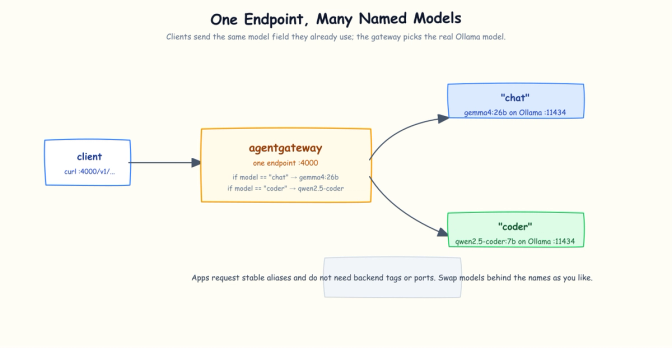
One gateway endpoint routes on the model field: chat resolves to gemma4:26b and coder to qwen2.5-coder:7b, both served by local Ollama.
Clients now select by name. Same endpoint, one JSON field changes:
curl -s http://localhost:4000/v1/chat/completions \
  -H "Content-Type: application/json" \
  -d '{"model":"chat","messages":[{"role":"user","content":"Say hello in exactly 5 words."}]}' \
  | jq -c '{model, content: .choices[0].message.content,
usage: {total_tokens: .usage.total_tokens}}'{"model":"gemma4:26b","content":"Hello, how are you today?","usage":{"total_tokens":1178}}curl -s http://localhost:4000/v1/chat/completions \
-H "Content-Type: application/json" \
-d '{"model":"coder","messages":[{"role":"user","content":"Write a bash one-liner to count files in a directory. Just the command."}]}' \
| jq -c '{model, content: .choices[0].message.content,
usage: {total_tokens: .usage.total_tokens}}'{"model":"qwen2.5-coder:7b","content":"`ls -1 | wc -l`","usage":{"total_tokens":56}}Two different models answered, selected purely by the model field. Note the token asymmetry: the reasoning chat model spent 1178 tokens saying hello, while the coder model spent 56 doing actual work.
The gateway also implements the standard OpenAI-compatible /v1/models discovery endpoint:
curl -s http://localhost:4000/v1/models \
| jq '{data: [.data[] | {id, object, owned_by}], object}'{
"data": [
{ "id": "coder", "object": "model", "owned_by": "openai" },
{ "id": "chat", "object": "model", "owned_by": "openai" }
],
"object": "list"
}(The owned_by: "openai" value is an artifact of the OpenAI-compatible schema the gateway emits for this listing; it reflects the API format, not which vendor serves the model. Both entries still route to the local Ollama backends configured above.)
This indirection is more valuable than it looks. chat and coder are your request interface; gemma4:26b is a routing implementation detail. You can swap the backend model, move the coder model to a different machine, or split traffic without changing the requested name or endpoint. Providers can still expose the selected backend in response fields and telemetry, as the captured model values above do.
Step 3: keys and budgets
Time to answer "who's using my GPU?" agentgateway calls these virtual keys: API keys managed at the gateway, with metadata, checked before any model is touched. Generate disposable keys for this walkthrough rather than publishing credentials that might be copied into a real deployment:
export ALICE_API_KEY="sk-local-alice-$(openssl rand -hex 16)"
export BOB_API_KEY="sk-local-bob-$(openssl rand -hex 16)"
The same environment variables are referenced by the YAML and the curl commands:
# 03-keys-budgets.yaml
config:
  adminAddr: localhost:15000
  statsAddr: localhost:15020
  readinessAddr: localhost:15021
llm:
  port: 4000
  policies:
    apiKey:
      mode: strict
      keys:
      - key: "$ALICE_API_KEY"
        metadata:
          user: alice
      - key: "$BOB_API_KEY"
        metadata:
          user: bob
    localRateLimit:
    - maxTokens: 300          # deliberately tiny, to demo the limit
      tokensPerFill: 300
      fillInterval: 60s
      type: tokens
  models:
  - name: chat
    provider: ollama
    params:
      model: gemma4:26b
  - name: coder
    provider: ollama
    params:
      model: qwen2.5-coder:7b
With both key environment variables still set, restart the demo process with agentgateway -f 03-keys-budgets.yaml.
Two policies. apiKey in strict mode means no key, no service:
curl -si http://localhost:4000/v1/chat/completions \
  -H "Content-Type: application/json" \
  -d '{"model":"coder","messages":[{"role":"user","content":"hi"}]}' \
| awk 'NR == 1 || tolower($1) == "content-type:" || tolower($1) == "content-length:"'HTTP/1.1 401 Unauthorized
content-type: text/plain
content-length: 48With alice's key:
curl -s http://localhost:4000/v1/chat/completions \
  -H "Authorization: Bearer $ALICE_API_KEY" \
  -H "Content-Type: application/json" \
  -d '{"model":"coder","messages":[{"role":"user","content":"hi"}]}' \
  | jq -c '{content: .choices[0].message.content,
usage: {total_tokens: .usage.total_tokens}}'{"content":"Hello! How can I help you today? Is there something specific on your mind or any questions you have? I'm here to answer any questions you might have. Let me know how I can assist you better.","usage":{"total_tokens":74}}The second policy is LLM-aware: localRateLimit with type: tokens. Not requests per minute but tokens per minute, a useful consumption proxy even though compute time and energy per token vary by model, context, batching, and hardware. The mechanics are worth understanding: by default the gateway lets a request through, reads the real token usage from the model's response, and settles it against the budget. A completion can therefore overshoot the remaining budget once; subsequent requests are rejected. Set tokenize: true on the model if you also want request-time token estimation.
Watch the budget run out. I ran this loop immediately after the 74-token request, before the 60-second refill interval elapsed:
for i in $(seq 1 8); do
  CODE=$(curl -s -o /tmp/resp.json -w "%{http_code}" http://localhost:4000/v1/chat/completions \
    -H "Authorization: Bearer $ALICE_API_KEY" \
    -H "Content-Type: application/json" \
    -d '{"model":"coder","messages":[{"role":"user","content":"Write a bash one-liner to show disk usage. Just the command."}]}')
  echo "request $i: HTTP $CODE  tokens: $(jq -r '.usage.total_tokens // "blocked"' /tmp/resp.json 2>/dev/null)"
donerequest 1: HTTP 200 tokens: 55
request 2: HTTP 200 tokens: 53
request 3: HTTP 200 tokens: 115
request 4: HTTP 200 tokens: 58
request 5: HTTP 429 tokens:
request 6: HTTP 429 tokens:
request 7: HTTP 429 tokens:
request 8: HTTP 429 tokens:The accounting includes the 74-token authenticated request immediately before the loop. The first three loop requests brought recorded consumption to 297 tokens. Because settlement happens after each response, request 4 was admitted and took total usage to 355, a one-response overshoot. The bucket was then exhausted, so request 5 and later requests received 429. The gateway did not predict the size of request 4's completion. A follow-up request shows the relevant response headers:
curl -si http://localhost:4000/v1/chat/completions \
  -H "Authorization: Bearer $ALICE_API_KEY" \
  -H "Content-Type: application/json" \
  -d '{"model":"coder","messages":[{"role":"user","content":"hi"}]}' \
| awk 'NR == 1 || tolower($1) ~ /^x-ratelimit-(limit|remaining|reset):$/'HTTP/1.1 429 Too Many Requests
x-ratelimit-limit: 300
x-ratelimit-remaining: 0
x-ratelimit-reset: 52Limit, remaining, and seconds until the bucket refills. These are conventional rate-limit headers that clients can use for backoff, but verify how your specific SDK interprets them.
One finding worth calling out: I then tried bob's key while alice was throttled, and bob got a 429 too. In this standalone simplified configuration, localRateLimit is a shared bucket for the whole gateway, not a per-key budget. Per-consumer quotas require a routing-based or remote rate-limit design keyed by the authenticated identity; they are not enabled by this simple block. The shared bucket protects the box from unbounded aggregate usage, but one runaway consumer can temporarily exhaust capacity for everyone.
On a shared box this means an agent experiment that goes into a loop eventually gets throttled, and the x-ratelimit-reset header tells it when capacity begins returning. Authentication identifies callers at the gateway, while the shared rate limit protects total capacity. Per-consumer dashboards and per-consumer quotas are additional controls rather than automatic consequences of issuing separate keys.
Step 4: failover
Local-first AI has one structural weakness: it is often one machine and one process. The pragmatic answer is not "make the local model never fail" but to detect an unhealthy target, evict it, and route subsequent requests to another local instance or an approved provider. The request that triggers eviction can still receive the upstream failure; transparent recovery requires an additional, tested retry policy in the gateway or client.
agentgateway does this with virtual models: a published model name backed by a routing policy across real models.
Start the backup Ollama instance on loopback port 11435 in a separate terminal or under a process supervisor:
OLLAMA_HOST=127.0.0.1:11435 ollama serveThe failover config keeps the full Step 3 policies: block, with strict API keys unchanged and the shared bucket raised to 10,000 tokens so the deliberately tiny demo limit does not mask the failover behavior. The new routing portion is:
# 04-failover.yaml (key part)
llm:
  models:
  - name: local-primary
    visibility: internal           # not directly addressable by clients
    provider: ollama
    params:
      model: gemma4:26b
    health:
      eviction:
        consecutiveFailures: 1   # one failure -> evict
        duration: 30s            # try the primary again after 30s
  - name: local-backup
    visibility: internal
    provider: ollama
    params:
      model: qwen2.5:3b
      baseUrl: http://127.0.0.1:11435/v1   # a second Ollama instance
  virtualModels:
  - name: assistant                # the only name clients ever use
    routing:
      failover:
        targets:
        - model: local-primary
          priority: 1
        - model: local-backup
          priority: 2
Combine the Step 3 policies: block with the routing above, changing maxTokens and tokensPerFill from 300 to 10000, then restart the gateway with agentgateway -f 04-failover.yaml.
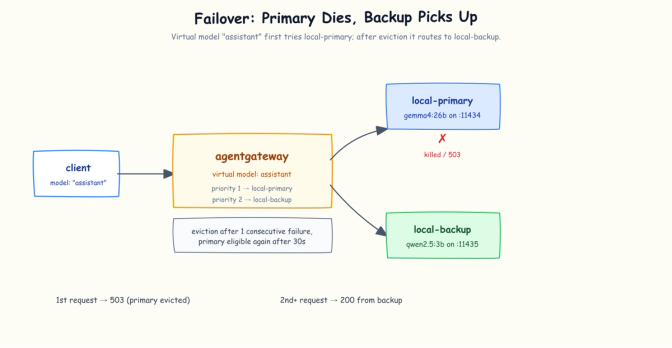
The assistant alias normally routes to Gemma. The first failed primary request triggers eviction, and subsequent requests route to the Qwen backup.
Clients ask for assistant. The gateway sends traffic to priority 1 while it is healthy, and to priority 2 after the primary is evicted. In this demo the backup is a second Ollama instance on the same box using a smaller model; its first inference still has a cold-load cost. That demonstrates process-level failover; it does not protect against a host or GPU failure. A cloud provider can also be used as an explicitly approved backup, with its API key held by the gateway rather than every app. That choice changes the trust boundary: prompts and responses leave the machine, provider charges apply, and data-residency, privacy, and retention policies must be reviewed before enabling it.
One block in that config deserves attention because I learned it through testing: the health: policy is what makes failover actually happen. My first attempt was just virtualModels with priorities, and when I stopped the primary I got fifteen straight 503s. Priorities tell the gateway the order of preference; the health policy tells it when to give up on a target (here: one failure evicts the primary for 30 seconds). Without it, the gateway does not evict the failed primary. With it:
Normal operation:
curl -s http://localhost:4000/v1/chat/completions \
  -H "Authorization: Bearer $ALICE_API_KEY" \
  -H "Content-Type: application/json" \
  -d '{"model":"assistant","messages":[{"role":"user","content":"Which model are you? One short sentence."}]}' \
| jq -c '{model, content: .choices[0].message.content}'{"model":"gemma4:26b","content":"I am a large language model, trained by Google."}Now stop only the primary Ollama instance on port 11434 (keep the backup on 11435 running) and issue the same authenticated request three times. This loop preserves the status code while formatting successful OpenAI responses:
for i in 1 2 3; do
  CODE=$(curl -s -o /tmp/failover.json -w "%{http_code}" \
    http://localhost:4000/v1/chat/completions \
    -H "Authorization: Bearer $ALICE_API_KEY" \
    -H "Content-Type: application/json" \
    -d '{"model":"assistant","messages":[{"role":"user","content":"Which model are you? One short sentence."}]}')
  if [ "$CODE" = 200 ]; then
    jq -c '{model, content: .choices[0].message.content}' /tmp/failover.json
  else
    echo "HTTP $CODE"
  fi
done
HTTP 503
{"model":"qwen2.5:3b","content":"I am a language model called Qwen trained by Alibaba Cloud."}
{"model":"qwen2.5:3b","content":"I am a text-generation large model trained by Alibaba Cloud."}The first request receives the failure and causes the primary to be evicted; every request after that is served by the backup. Bring the primary back, wait out the 30-second eviction window, and run the same authenticated curl again:
{"model":"gemma4:26b","content":"I am a large language model, trained by Google."}Traffic returned to the primary on its own. The gateway's log tells the story in four selected, wrapped lines; watch the endpoint field:
endpoint=localhost:11434  http.status=200 gen_ai.response.model=gemma4:26b
endpoint=localhost:11434  http.status=503 error="upstream call failed:
  Connect: Connection refused (os error 111)" reason=UpstreamFailure
endpoint=127.0.0.1:11435  http.status=200 gen_ai.response.model=qwen2.5:3b duration=3647ms
endpoint=127.0.0.1:11435  http.status=200 gen_ai.response.model=qwen2.5:3b duration=289ms
(That 3647ms→289ms drop is the backup model loading into memory on its first request, then answering warm.)
That's the difference between "a port" and a managed service. The first request exposed the primary failure and triggered eviction; subsequent requests used the smaller backup for the 30-second eviction window. A client that requires uninterrupted behavior must add a tested retry for the initial failure and must be prepared for capability differences between the 26B primary and 3B backup.
Step 5: what the models consumed
Everything the gateway learned along the way is exported as OpenTelemetry-convention metrics on port 15020:
curl -s localhost:15020/metrics | grep gen_ai_client_token_usage_sumagentgateway_gen_ai_client_token_usage_sum{gen_ai_token_type="input",
gen_ai_system="ollama",gen_ai_request_model="qwen2.5:3b",...} 76.0
agentgateway_gen_ai_client_token_usage_sum{gen_ai_token_type="output",
gen_ai_system="ollama",gen_ai_request_model="qwen2.5:3b",...} 27.0
agentgateway_gen_ai_client_token_usage_sum{gen_ai_token_type="input",
gen_ai_system="ollama",gen_ai_request_model="gemma4:26b",...} 50.0
agentgateway_gen_ai_client_token_usage_sum{gen_ai_token_type="output",
gen_ai_system="ollama",gen_ai_request_model="gemma4:26b",...} 291.0Because the gateway was restarted for Step 4, these counters reflect traffic since that restart rather than the entire walkthrough. The lines above are wrapped and unrelated labels are represented by ... for readability; the numeric values are from the captured metrics. Input and output tokens are available per model. Point a Prometheus at the trusted stats endpoint and per-model dashboards are a query away. You can even see the failover story in the numbers above: the backup (qwen2.5:3b) served its share of tokens while the primary was out.
If you need per-consumer dashboards, agentgateway can add a custom metric label derived from virtual-key metadata, for example config.metrics.fields.add.user_id: apiKey.user. That label was not enabled in this capture, so I am not presenting the metrics above as per-key accounting. Be deliberate about label cardinality before enabling it at larger scale.
There's also a built-in admin UI at http://localhost:15000/ui with the full routing config and an LLM Playground for firing test prompts through the gateway. Readiness is available on localhost:15021/healthz/ready. Every config in this walkthrough binds the admin, metrics, and readiness listeners to localhost.
What just happened
What each step cost, measured in YAML:
| Step | Capability | Lines of config added |
|---|---|---|
| Front door | Protocol-aware proxying, token-counting logs | ~11 |
| Named models | One endpoint, stable model names, /v1/models | ~4 |
| Virtual keys | Per-consumer auth, 401s for missing or invalid keys | ~10 |
| Token budget | Shared 429s after accounted usage exhausts the bucket | ~5 |
| Failover | Subsequent requests route to a backup after eviction | ~24 |
Counts are non-comment lines added relative to the previous step's file. Lines that only change value or name, such as the wildcard model name becoming chat in Step 2 and the bucket size growing in Step 4, count as modifications rather than additions.
No Kubernetes, no sidecars, no config language to learn beyond one YAML file. The models didn't change; the machine didn't change. The GPU now has an intentional interface: authenticated requests with stable model names in, token-accounted responses out.
The model is the engine; the gateway provides the service boundary. The same applies to a homelab GPU and a DGX Spark, although the operational details vary. When one box is no longer enough, agentgateway also supports Kubernetes and the Gateway API with the same data plane and many of the same concepts.
Honest take
Things I hit during this run that you should know before yours:
- Failover needs the
health:policy. Virtual-model priorities alone don't reroute. Without eviction configured, a dead primary means 503s, not failover (I got fifteen in a row before figuring this out). One failure also reaches the client before eviction kicks in; add and test an appropriate retry policy or accept one visible error per outage. Avoid blindly retrying streamed or non-idempotent operations. - Budgets are a shared bucket.
localRateLimitin the simplified config meters the gateway as a whole, not per API key: bob gets throttled when alice burns the budget. Fine for protecting the GPU, but not per-user quotas in this config shape. - Budgets settle after the response. The gateway counts real usage from the model's reply, so a single huge completion can overshoot the budget once before throttling starts.
tokenize: trueenables pre-flight estimation if that matters. - Env-var substitution parses the whole file, including comments. A commented-out secret variable in my config crashed startup with
environment variable not found. Keep references to unset secret variables out of the file, including comments. - Reasoning models can consume budgets quickly. Gemma spent 296 to 1274 tokens on one-sentence answers because its deliberation counts as completion tokens. Size token budgets for your actual models, not your intuition.
- A cloud backup changes the data boundary. Treat cloud failover as an explicit policy decision, not just another target: prompts may leave the machine, incur cost, and become subject to a provider's retention and regional controls.
- Protect every listener. If you expose the gateway beyond localhost, enable TLS; API keys over plain HTTP can be intercepted. Open port
4000only to intended clients, keep11434loopback-only, and restrict the admin, metrics (15020), and readiness (15021) listeners to trusted hosts. The YAML in this walkthrough binds all three management listeners to localhost.
Get involved
agentgateway is an AAIF-hosted project with open source code and open governance. If this post made you want to explore it:
- Source, issue tracker, and contribution guidance: github.com/agentgateway/agentgateway
- Docs: standalone mode, Kubernetes mode
- Community: join the Discord server or see the community-meeting details
References
- agentgateway standalone docs · binary install
- Ollama provider · Virtual keys · Virtual models & failover
- LLM observability · LLM playground
- agentgateway joins AAIF
- Ollama · DGX Spark
Run on an NVIDIA DGX Spark (GB10, 121.7 GiB unified memory visible to CUDA) with Ollama 0.32.9 and agentgateway 1.4.1. JSON outputs were captured from the machine and formatted by the shown jq expressions; long metric and log lines are explicitly marked as selected, wrapped, or abbreviated. The architecture is portable; provider, model, and process details vary by environment.
Share
Author