

Personal write-up by Andrew Espira (https://github.com/espirado). Demo: mcp-resources-apps-demo (https://github.com/espirado/mcp-resources-apps-demo).
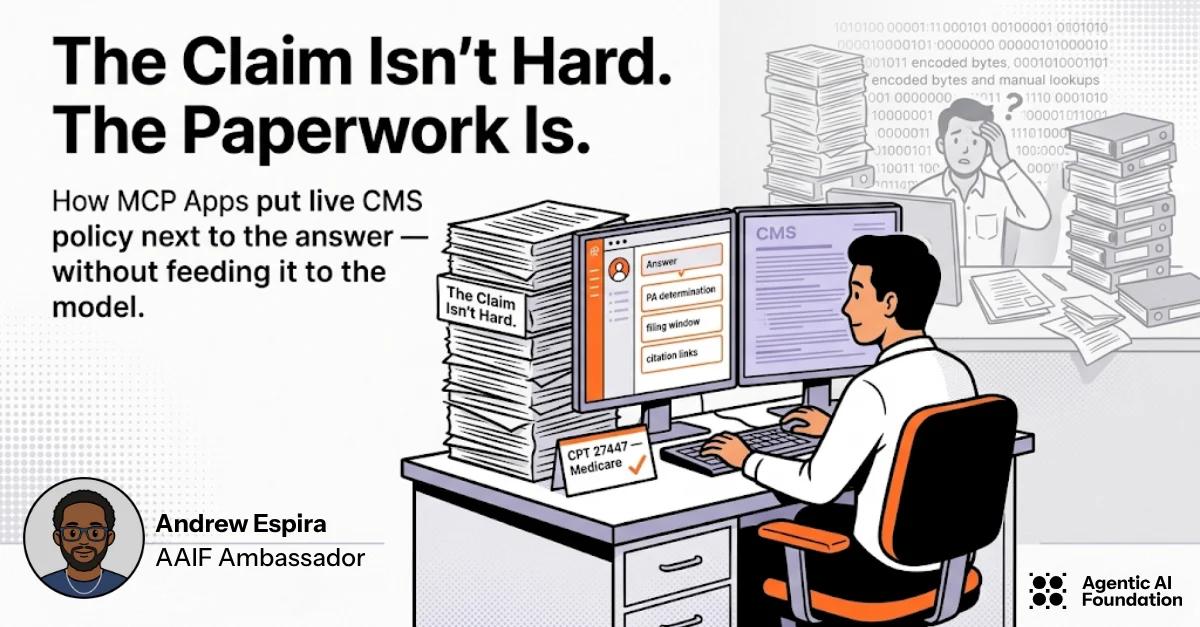
It’s Monday morning in a hospital billing office.
On the screen: a knee replacement ready to drop. CPT 27447. Payer: Medicare. Somewhere in the Medicare Coverage Database there is an LCD that says whether the chart supports medical necessity — conservative care notes, imaging evidence, the whole checklist reviewers argue about when a claim comes back.
That hunt is the job.
Coding the line item takes minutes. Finding and rereading the source policy takes the rest of the morning. Miss the documentation language and the claim comes back. Miss timely filing and it may never get paid. This is one of the hardest parts of medical billing: not the code tables, but the scattered manuals, LCDs, and PA rules humans still have to verify with their own eyes.
Agents are good at structured answers. They are bad roommates for 40-page PDFs and CMS HTML. Stuff a policy into a tool result as base64 and you hit host size limits, burn the context window, and still leave a reviewer squinting at encoded bytes.
MCP Apps are how you split that work cleanly:
- the agent / tool returns *what to do* (PA determination, attachments, filing window) plus citation URIs
- the App fetches and renders the live source for the human
- the model never has to eat the paperwork
I built a personal claims desk to make that concrete — wired to live policy fetches (CMS for Medicare scenarios, the payer’s own PA list for UnitedHealthcare) and optional RCI enrichment that never overrides the cataloged source facts.
Scene 1 — The desk before the answer
The App opens on an empty claims desk. You pick a payer and a CPT, then call a single MCP tool. The copy on the page is the design intent out loud: JSON for the agent path, documents for the reviewer path.
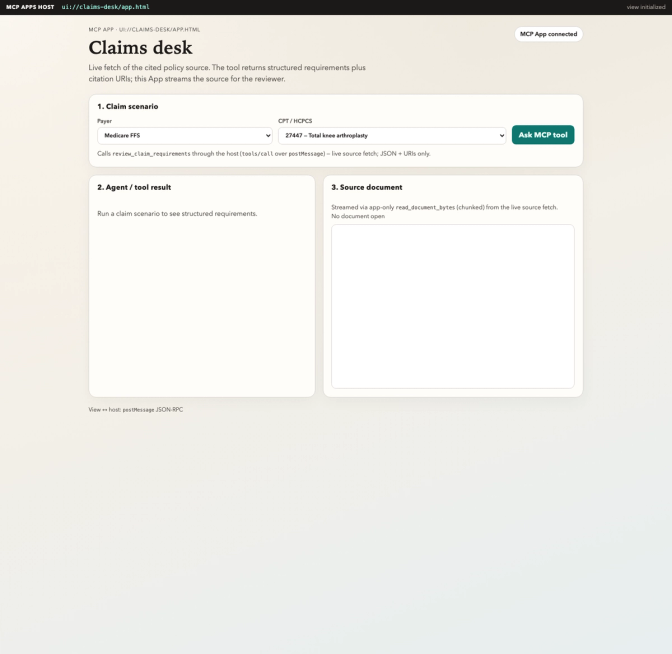
Claims desk idle — choose payer and CPT, then ask the MCP tool
This is the moment most “AI for RCM” demos skip. They return a paragraph of advice and hope the analyst trusts it. Real claims work doesn’t work that way. Advice without the policy page open is how denials happen.
Scene 2 — A real claim: TKA against LCD L33618 (Jurisdiction N)
Scenario: Medicare FFS in First Coast Jurisdiction N (Florida, Puerto Rico, U.S. Virgin Islands), CPT 27447 (total knee arthroplasty).
LCD L33618 is that MAC’s local coverage determination — not a national Medicare FFS policy. The MCP tool review_claim_requirements comes back with structured guidance scoped that way: documentation attachments from the LCD, `doc://cms/...` URIs, and timely filing as 12 months / one calendar year after the date of service (CMS Pub. 100-04, Chapter 1, §70) — not a fixed 365 days.
Then the App — not the model — opens the source via app-only read_document_bytes (chunked). On the right you see the live LCD coverage body, including contractor/jurisdiction: indications, limitations, medical necessity — not the MCD page chrome, license modals, or email forms.
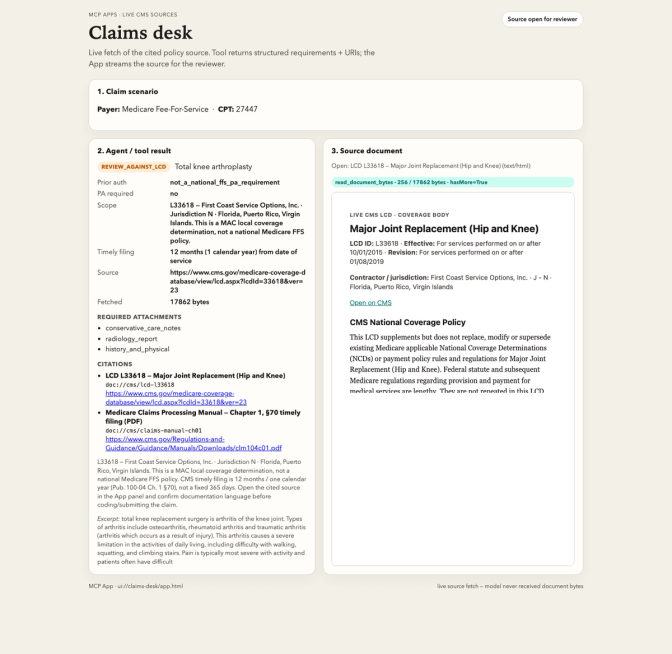
Structured claim requirements beside live LCD L33618 (First Coast Jurisdiction N)
That split is the whole product idea:
| Left panel (tool / agent) | Right panel (MCP App) |
|---|---|
| Machine-readable requirements | Human-readable source of truth |
| Structured for machine processing | Readable for human verification |
| No document bytes | LCD / PDF streamed in chunks |
The teal chip on the document pane (read_document_bytes · … · hasMore=true) is intentional. It shows the App pulling paperwork through the protocol instead of pretending the model “read” the file.
Scene 3 — Same CPT family, different paperwork
Swap to an MRI (70553). On Medicare FFS there is still no national prior-auth program for that code; filing is again 12 months / one calendar year, not 365 days. The App opens the Claims Processing Manual Chapter 12 PDF — actual pages, streamed beside the answer — with Chapter 1 cited for the filing rule.
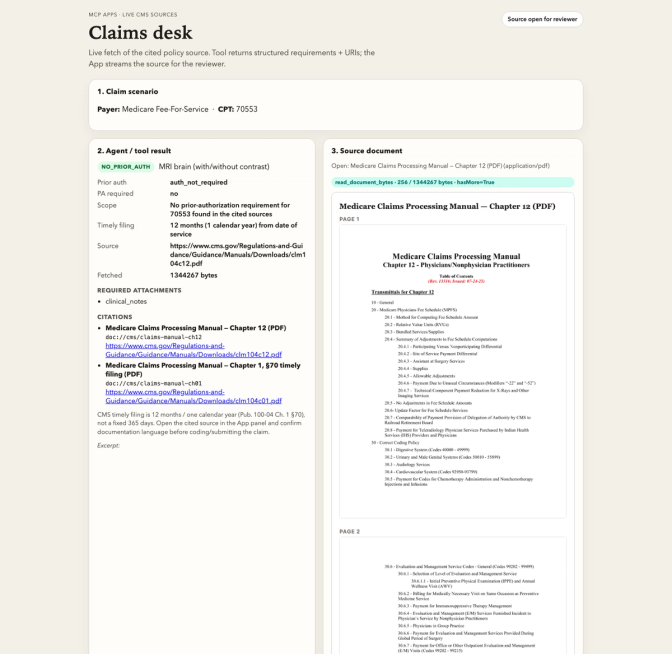
Medicare MRI — no PA, claims manual open
Flip the same CPT to UnitedHealthcare Commercial / Individual Exchange, outpatient or office MRI. Same desk, different source: UHC’s radiology PA CPT list (70553 is on it) and the outpatient radiology FAQ. PA applies to that plan family and setting; the FAQ excludes UMR, UHSS, Medicare Advantage, Medicaid/CHIP, several commercial products, and imaging in the ER, observation, urgent care, or inpatient. A PA number under this protocol is valid 45 calendar days. Filing windows vary by plan — the radiology list does not support a blanket 90-day rule. The App opens the UHC PDF, not a Medicare manual.
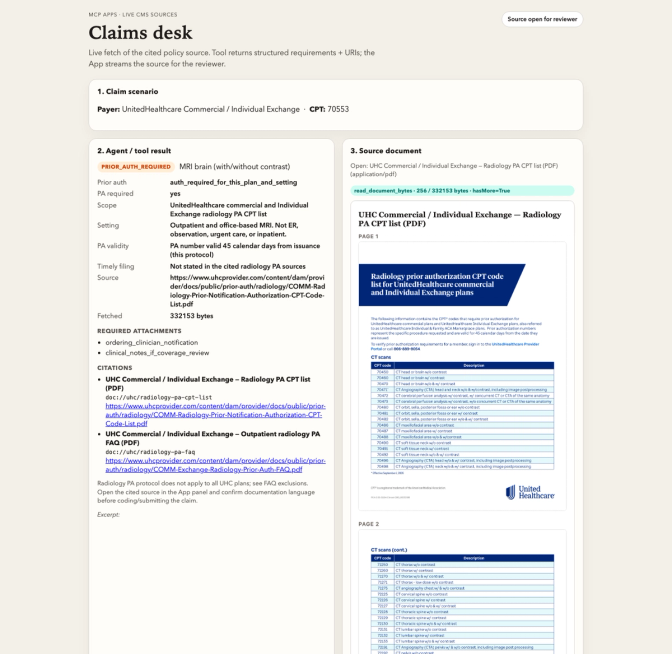
UHC commercial outpatient MRI — PA on the cited CPT list
One more beat: CPAP / E0601 on Medicare DMEPOS. E0601 is on the Master List but not on the Required Prior Authorization List, so PA is not required. CMNs/DIFs were discontinued for dates of service on or after Jan. 1, 2023. For items that *are* on the Required List, CMS’s standard DMEPOS PA review is now seven calendar days. The App opens PAP LCD L33718 beside that answer.
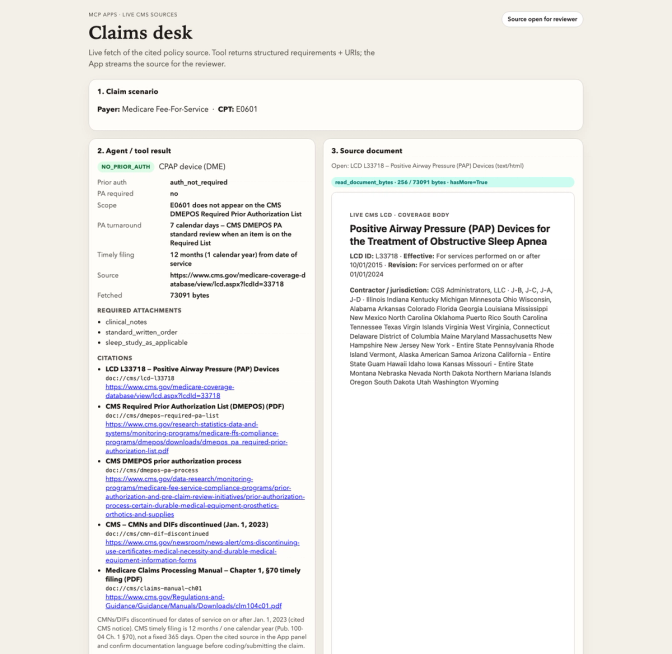
Medicare DME — E0601 not on the Required PA List
Billing teams don’t have one PDF problem. They have hundreds, per payer, per year, with effective dates that move. The protocol pattern has to survive that volume: always return handles, always render on demand, always keep bytes out of the prompt.
What MCP is doing under the desk
Host initialize advertises io.modelcontextprotocol/ui
       │
       ▼
tools/list  review_claim_requirements
       │     _meta.ui.resourceUri = ui://claims-desk/app.html
       ▼
resources/read  ui://claims-desk/app.html
       │     mime text/html;profile=mcp-app
       ▼
Host renders the HTML in a sandboxed iframe
       │     View: ui/initialize  (postMessage)
       │
Analyst picks payer + CPT  (in the App, or the model calls the tool)
       │
       ▼
tools/call  review_claim_requirements
       │     HTTPS GET cited source (CMS LCD / manual, or UHC PA PDF)
       │     catalog facts win over optional RCI enrichment
       │     returns JSON + doc:// URIs
       │     (no document bytes)
       ▼
Host pushes ui/notifications/tool-result into the iframe
       │     (or the App calls tools/call itself via the host)
       ├─ show status / PA / attachments / filing
       │
       └─ tools/call  read_document_bytes   ← app-only visibility
                chunked base64
                └─ render LCD HTML or PDF pages beside the answer
The tool that the model calls is stamped with:
"_meta": { "ui": { "resourceUri": "ui://claims-desk/app.html" } }App-only helpers (read_document_bytes, preview_pdf_pages) use the same resource URI plus "visibility": ["app"] so hosts hide them from the model’s tool list.
I verified the path with a small evidence runner: the claim tool returns URIs only; reassembling chunks matches resources/read byte-for-byte against the live fetch.
Why an App — not just another tool
- Tools alone give you a chatbot with opinions about PA.
- Resources alone give you a file browser.
- Apps give you a workstation: answer + paperwork in one place, with the human still in the loop.
If you build agents for any document-heavy domain — insurance, compliance, procurement, clinical admin — the same story applies. The model proposes. The App shows the exhibit. The person decides.
Try it
git clone https://github.com/espirado/mcp-resources-apps-demo
cd mcp-resources-apps-demo
python3.12 -m venv .venv && source .venv/bin/activate
pip install -e .
python scripts/serve_app.py
# open http://127.0.0.1:8765  (local Apps host: ui:// iframe)

# optional live enrichment
# export RCI_API_KEY=...
# export RCI_API_URL=https://api-dev.rcintell.com
Pick Medicare / 27447, click Ask MCP tool, open the LCD citation. Watch First Coast Jurisdiction N land next to 12-month filing. Then try 70553, E0601 (no DMEPOS PA), and UHC commercial outpatient MRI — same desk, different paperwork.
What I want other builders to steal
- Don’t put PDFs in tool results. Return citation URIs.
- Put paperwork in the App. That’s what reviewers actually need.
- Chunk large documents with an app-only tool (
visibility: ["app"]) when hosts have size limits. Bind the result tool with_meta.ui.resourceUri. - Fetch real sources. Synthetic fixtures teach the pattern; live LCDs and manuals prove it.
- Tell a domain story. MCP Apps land harder when the UI solves a job people already hate — like hunting payer policy before a claim goes out.
The claim was never the hard part. The paperwork was. MCP Apps are how we stop asking the model to swallow it.
Share
Author