

Since last year, we have created several open source projects: agentgateway, kagent, agentregistry, and agentevals. We also donated agentgateway, kagent, and agentregistry to vendor-neutral foundations under the Linux Foundation. These projects were not built for experimentation alone. They were driven by real internal needs as we improved operational efficiency with agentic AI at Solo.io and for our users.
In this blog, I share how we use the gateway pattern to govern, secure, and observe traffic from our AI agents to MCP servers and LLMs using agentgateway, without requiring modifications to the agents or MCP servers.
Governing Traffic from Internal Agents to MCP Servers
We have developed multiple MCP servers to support our internal AI agents. For example, our support agent allows employees to ask questions in our corporate Slack by mentioning @Support. The agent can access MCP tools to search our internal Slack conversations, query our codebase, interact with internal tools, and retrieve information from documentation and GitHub issues. It returns answers along with confidence estimates.
As the number of MCP servers grows, we needed a simple way to aggregate them behind a single interface. Agentgateway enables this through configuration alone, without requiring code changes or redeployments.
Multiplexing MCP Servers
Multiplexing is achieved by configuring multiple MCP backends behind a single listener. For example, the configuration below exposes multiple stateless MCP services as a unified virtual MCP server on port 3000:
config:
  port: 3000
binds:
- listeners:
  - routes:
    - backends:
      - mcp:
          statefulMode: stateless
          targets:
          - mcp:
              host: http://docs.mcp.svc.cluster.local:3003/mcp
            name: knowledge-base
          - mcp:
              host: http://slack.mcp.svc.cluster.local:8000/mcp
            name: slack-conversations
          …
      matches:
      - path:
          exact: /mcp
Auth and Policy Enforcement
Adding authentication or timeout policies does not require modifying each MCP backend server or adding timeout, JWKS, audience, or resource metadata configuration in application code, nor does it require rebuilding or redeploying services.
With agentgateway, these concerns are handled centrally through configuration while MCP servers remain unchanged. The example below configures timeouts along with MCP authentication policies for the support agent’s MCP backends:
    policies:
        timeout:
          requestTimeout: 300s
          backendRequestTimeout: 300s
        mcpAuthentication:
          mode: strict
          issuer: https://auth-mcp.example.com
          jwks:
            url: https://auth-mcp.example.com/.well-known/jwks.json
          audiences:
          - https://agent-tools.example.com/mcp
          resourceMetadata:
            resource: https://agent-tools.example.com/mcp
            scopesSupported:
            - read:all
            bearerMethodsSupported:
            - header
            - body
            - query
            resourceDocumentation: https://agent-tools.example.com/docs
            resourcePolicyUri: https://agent-tools.example.com/policies
With this setup, both our internal agents and engineers can securely access MCP servers via Claude or Cursor by pointing to the multiplexed endpoint. For example, a simple mcp.json file in Cursor can be used to configure access to all MCP servers:
{
  "mcpServers": {
    "soloio-mcp": {
      "url": "https://agent-tools.example.com/mcp"
    }
  }
}
Observability: Logs and Metrics
We also use agentgateway to add observability without modifying MCP backends. For example, we enrich metrics to identify which user and product are associated with each tool call:
config:
  metrics:
    fields:
      add:
        product: 'default(json(request.body).params.arguments.product, "not-applicable")'
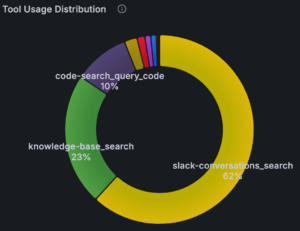
This allows us to analyze tool usage distribution and better understand how our internal agents use tools over time. Below is an example of tool usage for the support agent:
Govern Traffic to LLMs
Our internal AI usage has grown rapidly, especially with coding agents like Claude Code and Cursor.
Initially, engineers accessed Anthropic models through Vertex AI, but we lacked visibility into usage patterns and per-user, per-model costs. By routing LLM traffic through agentgateway, we gained the ability to track usage and spending at both individual and organization levels. This helps us decide when subscription models make more sense than pay-as-you-go usage models.
Track Usage and Cost for Each Person
By adding metrics and logs in agentgateway configuration, we can correlate telemetry with each user’s email to understand LLM model usage and cost per user:
config:
  metrics:
    fields:
      add:
        user_email: "jwt.email"
        solo_org: 'request.headers["x-solo-org"]'
frontendPolicies:
  accessLog:
    add:
      user_email: "jwt.email"
Authentication and Authorization for LLM Access
We enforce strict authentication and restrict access for LLM models to verified Solo.io users:
llm:
  policies:
    jwtAuth:
      mode: strict
      issuer: https://accounts.google.com
      audiences:
        - "111111111.apps.googleusercontent.com"
      jwks:
        url: https://www.googleapis.com/oauth2/v3/certs
    authorization:
      rules:
        - 'jwt.email.endsWith("@solo.io") && jwt.email_verified == true'
These policies apply across all LLM models accessed through Vertex AI.
Model Routing and Transformation
Agentgateway also supports dynamic model selection and transformation. For example, below is a simple routing configuration for the engineering organization consuming models via Vertex AI. In this setup, agentgateway determines the actual model being used based on the request, whether it is a Google model or a partner model such as Opus 4.7 or Sonnet 4.6.
models:
    # Sepparate orgs with different projects and headers
    - name: "*"
      provider: vertex
      matches:
        - headers:
            - name: "X-Solo-Org"
              value:
                exact: "engineering"
      transformation:
        model: |
          request.path.endsWith(":streamRawPredict") || request.path.endsWith(":rawPredict") ?
          request.path.regexReplace("^.*/publishers/anthropic/models/(.+?):.*", "$${1}") :
          llmRequest.model
      params:
        vertexProject: developers-369321
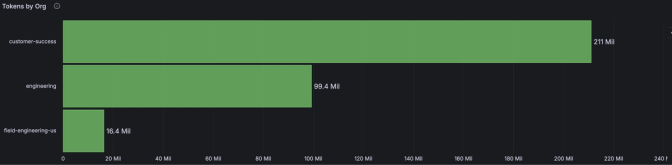
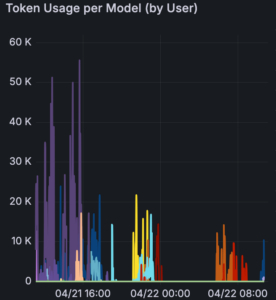
Through metrics provided by agentgateway, we can visualize token usage by organization in our Grafana dashboard, as well as tokens per model.
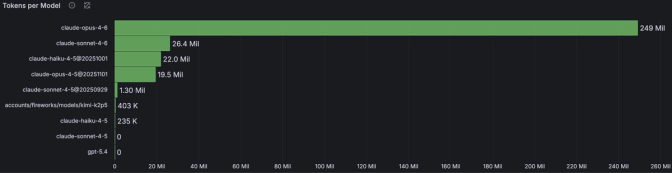
We can also easily view token usage per model by each user over any time window.
Final Thoughts
At Solo.io, we focus on efficiency and continuous innovation, and we believe agentic AI plays a key role in transforming how we work. Agentgateway has helped us govern and optimize both MCP and LLM traffic in a way that is transparent to agents and backend services, without requiring any modifications to MCP servers or LLMs. This separation of concerns gives us a cleaner path to scale agentic workloads safely and predictably.
Looking ahead, we are excited to push this gateway pattern further and explore:
- Fine-grained authorization for MCP tools, enabling more precise control over what agents can access and execute
- Progressive disclosure of MCP servers through search and execution, allowing agents to discover capabilities dynamically instead of relying on static configuration
- Code execution modes that reduce back-and-forth interactions between agents and MCP tools, improving efficiency and response quality
If you have already adopted an agent gateway, I would love to hear your experience. If you haven’t but are planning to adopt one, I encourage you to explore the agentgateway project and reach out to the community with any questions!
Share
Author